PlayTV Review
We like to watch.
Version tested: PlayStation 3
As we're frequently told, we ain't seen nothing yet. PlayStation 3 (and Xbox 360) can go a lot further than the pictures and sounds we're seeing and hearing in even the very best games. Never mind Killzone 2 and LittleBigPlanet, says Sony, just you wait for the games released in the two years after that.
If you find that difficult to believe, just pick up PlayTV, which acts as a Freeview box and personal video recorder (PVR), but also allows you to schedule TV recordings and then go back to gaming, watching a Blu-ray, or staring forlornly at the PlayStation Store shelves. Perhaps not the most demanding bit of multitasking ever, but a useful, invisible friend if ever you want one.
Setup is simple: plug the aerial cable into the PlayTV box and run the supplied USB cable to the PS3, then insert the disc. This installs the software to the hard disk so you can bin the Blu-ray afterwards (updates will be provided by PSN, presumably), hiding the three-minute process behind an unskippable rendition of the "how it works" video
you may already have seen on Eurogamer TV.
Once you're actually in, the software scans the aerial input for channels, which it then remembers. We've done this several times and it always takes about 90 seconds. Then it's into the programme guide (EPG), and you're away.
EPGs are typically slow and cumbersome in our experience, but PlayTV's is slick and responsive, with good visual cues to help guide you around: there's a throbbing timeline to highlight programmes in progress, with the date and half-hour markers along the top. When you highlight a programme, details appear in a separate window beneath the guide, showing you how much time has elapsed since the scheduled start, as well as programme info beamed down from the sky.
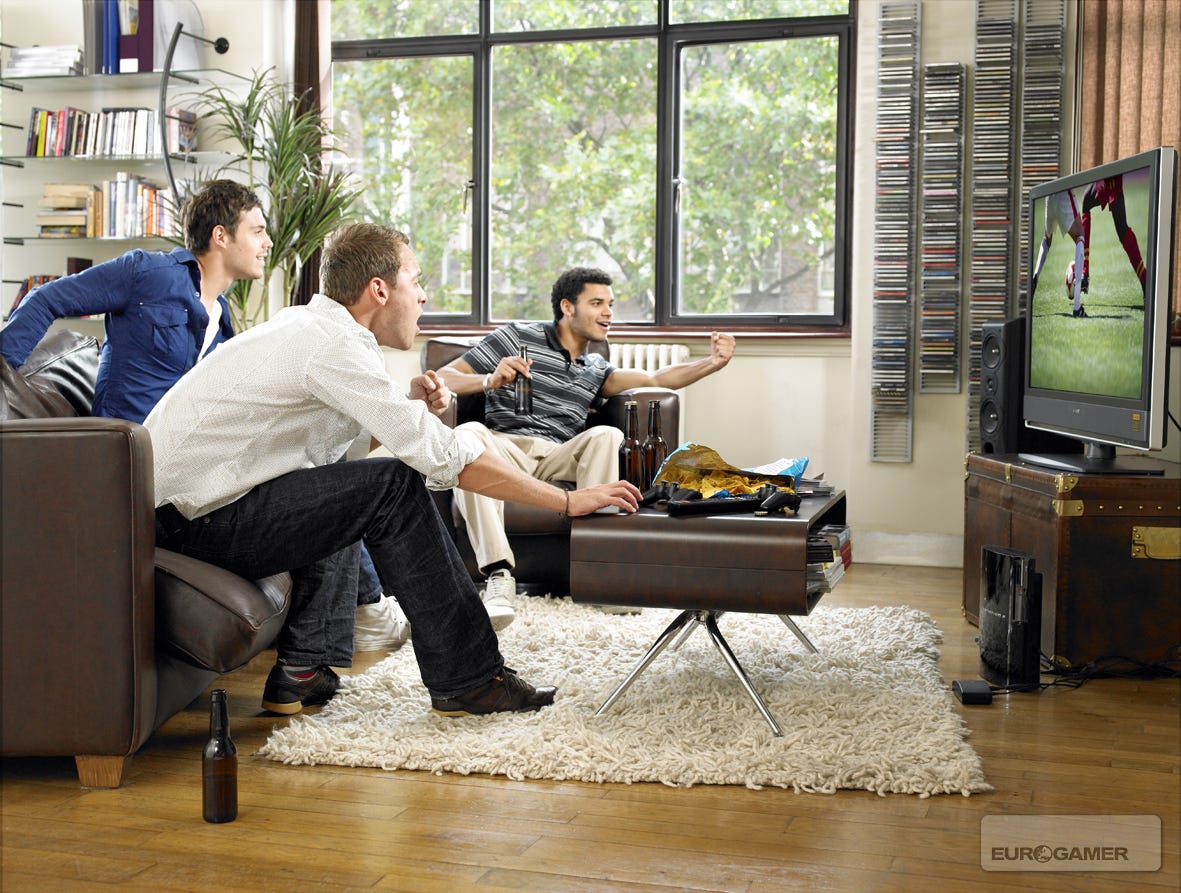
Just don't look at the PlayTV box itself, which is fugly.
To record something, you just hit the Select button, or you can scroll through a week's worth of listings to schedule recordings. When you've programmed in an item, the relevant time period is highlighted red at the top of the EPG, which is useful for two reasons: because your target programme may be higher or lower on the channel list and therefore out of sight, and because you can only record one thing at a time. To overcome the first part of that, you can create a favourites list that only tracks the best channels (More4 represent).
This being a PVR, you can also multitask; watching another channel at the same time, or exiting the software and doing something else on the PS3. The XMB is available within the PlayTV software at a push of the Home button, with the same degree of functionality you get from games: messaging and friends management are active, but to switch to other activities you need to exit PlayTV. If you do, though, the software keeps running invisibly in the background, keeping you abreast of recording activities with Trophy-style notification: "Recording: Property Ladder." Win!
From XMB to live TV, booting PlayTV up takes about 30 seconds, and the main menu - accessible by hitting the triangle button when you're watching TV - is the carousel you've probably seen in screenshots, allowing you to switch between live TV, the EPG (and a handy search tool for the same), your library of recordings and the future schedule.
The library lists each recording, and the interface is consistent with the EPG, although you can also opt to view thumbnail icons, which encompass a tiny playback window so you can see what Sarah Beeny's up to this week before deciding to watch Judge Judy instead. The interface also shows programmes currently recording, and there's nothing to stop you watching the first part while the tail end is concluding.
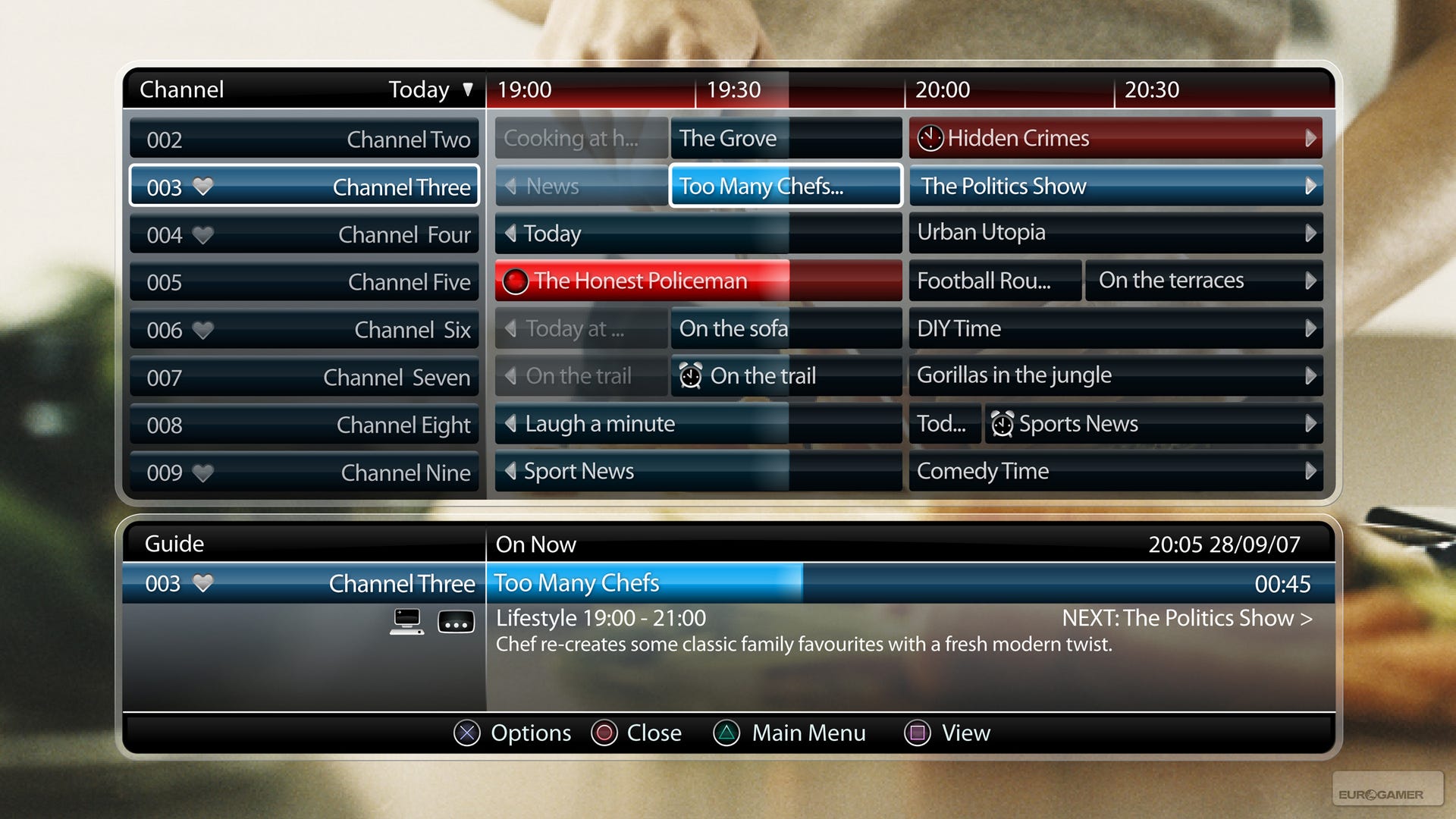
The EPG is slick and responsive.
As with the EPG, there's also a constant reminder of how much hard disk space you have remaining in the bottom-left, and our sample downloads suggest you need about 500MB of space for 30 minutes. If you do need to free up space by deleting game demos and other files, you have to exit the PlayTV software to do it (the in-game XMB showing its limitations again), but you can always set up a recording schedule and then exit to clear out some room; the software doesn't prevent you from cashing cheques your hard disk won't yet honour. If you can make the space by deleting programmes, you can do that within PlayTV.
Whether it's playback or live TV, PlayTV shrugs and takes it, and while the image your box is receiving may not be HD, the PS3 certainly is, so the EPG and playback controls, which also come into play if you pause live TV and need to resume, are clear and easy to use, with all sorts of helpful subtleties: indicators to show where you are in any given programme, how much is buffered and how much remains, and easily accessed subtitle, aspect radio and audio option screens.
And while PlayTV ships with a sturdy adhesive overlay for the BD remote control, should you have it, you can also use a Sixaxis or DualShock 3 if not, and the effect isn't so dreadful. If you're used to navigating video or audio recordings played through the XMB, or watching Blu-ray or DVD films, you already know roughly how it works.
Sometimes, though, you can't be watching S Club 7 videos in the lounge, and so PlayTV also supports Remote Play via PSP. We usually scorn Remote Play, and the PSP in general if we're honest, but we may be latter-day converts after we synched up over the internet and started watching TMF between meetings.
As with any Remote Play, you just need to switch on your PS3 locally or remotely and have a Wi-Fi access point wherever you are with the PSP. Providing the connection's reasonable you can operate PlayTV as if you were in the same room - watching TV, watching recordings, or scheduling stuff for later. You can do it over a local wireless network too, of course, so if you want to sit in bed and watch Grand Designs, get in there. Signal strength is important, and artefacting can be a problem, but it's at least acceptable in most cases.
What you're not able to do, despite early promises, is export your videos from the PlayTV software and immediately watch them on the PSP. You can move (not copy) videos from the PlayTV library to the XMB, which allows you to watch them without loading the PlayTV software (or even having PlayTV plugged in), and back them up to Memory Stick, but if you copy them onto PSP even the latest firmware doesn't know what to do with it. A source close to the project tells us that with fiddling you can get PSP Video 9 to convert the files to a usable format, but we haven't been able to replicate this just yet.
The big question, though, is how games perform with recording going on in the background - particularly after the setup procedure advises, "This may affect gameplay or the quality of recordings that take place. Recording is not possible during PlayStation 2 format discs." Eek!

The main menu. It changes colour as you rotate, but then who can't these days?
However, our immensely scientific testing procedure couldn't fault it. We played Ridge Racer 7 while PlayTV recorded Deal or No Deal and didn't notice any difference. We played Uncharted: Drake's Fortune and made sure we were doing that graphically gruelling bit with the submarine in the jungle just as Man City started to embarrass themselves against some unpronounceable Danes: not the slightest shudder as the recording started.
As with backwards compatibility and other all-encompassing software solutions, the proof of PlayTV's invisibility will be better known once it's been subjected to the masses, but given that it was held up for ages while Sony tested it with every PS3 game ever, you have to hope our experience with Ridge Racer 7, Uncharted and others was representative.
In fact, it seems as though the PS3 does more to piss off PlayTV than the other way around, judging by the slight crinkles in one of our Relocation, Relocation videos, which seemed to correspond pretty exactly to the points we initiated and exited Remote Play.
There were other minor issues, too, but these are mostly incidental, and potentially patchable if anyone moans enough. Probably the most irritating is the absence of information on what PlayTV's doing when you're not in the PlayTV software itself. Exit to the XMB, go into a game or load a Blu-ray and you'll be notified in the top-right when recordings begin or end, but there's no XMB-level access to schedules.
We also have a few wishlist items for the engineers at Sony Cambridge and Sony London, if anyone's twiddling their thumbs. How about picture-in-picture playback of live TV while gaming? And we could do with an alternative hardware model including a Conditional Access Module (CAM) for people with Setanta cards and similar before we can ditch our rubbish old Freeview boxes.

The library thumbnail view gets old quickly, but you can switch to more traditional views.
That said, we suspect most of the team's time, at least for the moment, will be taken up by trying to get rid of the software crashes we experienced.
While it should be noted that our PlayTV review copy comes with the standard disclaimer that it "may not be representative of the final build", it's clearly finished in most areas (right down to the inclusion of promotional sample videos and compatibility with retail PS3s - rare among unfinished PS3 review builds), and it did crash half a dozen times, usually while trying to watch a channel with poor signal strength. Worst of all, it's a hard lock that necessitates a reboot, busting any ongoing recordings until the power's back on.
And finally, did anyone at Sony notice that the physical PlayTV unit is a bit, well, ugly? It's a light, cheap-looking bit of plastic with a PS logo on it and an LED. And it may only be as big as a sunglasses case, as David Reeves once explained, but no amount of artfully premeditated lifestyle photography can disguise the fact that it has to plug into the front of the PS3, where the USB ports are, and hang around messily on the floor.
It's not as aspirational as an iPhone or Razr, then, but apart from a few glitches PlayTV does its job: you can watch, pause and record live TV, or record things in the background while you do other things. The PS3's ability to wake up when it's needed also means that you can leave the machine on standby and return home later to find it's switched itself on and done the recording without input.
There are slicker, more feature-packed PVR boxes out there, then, but they cost more, and if you don't have one then this is a fair purchase and a good example of delving into the PS3's processing headroom for practical lounge apps.
8 / 10
PlayTV is due out for PS3 on 19th September for GBP 69.99.
You may also like...
-
Retrospective: Star Wars Episode I Racer
-
Mass Effect 3 Demo: The First 20 Minutes
-
Face-Off: Final Fantasy 13-2
-
Why Devs Owe You Nothing
-
Digital Foundry: PS3 Skyrim Lag Fixed?
-
Game of the Week: Catherine
-
Who Killed Rare?
-
App of the Day: Ascension: Chronicle of the Godslayer
-
Gotham City Impostors Review
-
Face-Off: The Darkness 2
-
Epic's Sweeney on graphics tech: "the limit really is in sight"
-
Kingdoms of Amalur: Reckoning Review
-
EA evaluating FIFA Street features for FIFA 13
-
The Darkness 2 Review
-
Grand Slam Tennis 2 Review
-
Ultimate Marvel vs. Capcom 3 Vita Review
-
Catherine Review
-
App of the Day: Sir Benfro's Brilliant Balloon
-
Catherine launch trailer is looking saucy
-
Sony admits "dropping the ball" with Demon's Souls
-
One Piece: Unlimited Cruise SP Review
-
Metal Gear Solid: The "Lost" HD Remasters
-
King Arthur 2 Review
-
Skyrim patch 1.4 now live for Xbox 360
-
Mass Effect 3 FemShep trailer debuts


Comments (124) Latest comment 3 years ago
Comments threads automatically close after 30 days, but please feel free to continue chatting on the forum!
Comment below viewing threshold Show
Overall it sounds a little underwhelming though. I'll be waiting untill i've heard more from real world users, before thinking about investing.
It's a nice idea, but who really has a HD telly without built in freeview? so its just for recording freeview, that can only be watched back on the PS3.
Remote-play may be the redeaming feature, especially when abroad. I never could stand missing House or Top Gear while away from home.
Comment below viewing threshold Show
The problem with Freeview on HD televisions is typically appalling EPGs and the absence of PVR.
Comment below viewing threshold Show
Sarah Beeny won't be pleased you spelt her name wrong. Bet she's got a Wii.
Comment below viewing threshold Show
Can you record on one PS3 (say in the living room) and play back on a different one in your household's LAN?
Comment below viewing threshold Show
Does it automatically turn you PS3 on and off at the appropriate times, or will you have to leave your PS3 on all the time, guzzling a rediculous amount of electricity?
Comment below viewing threshold Show
suddenly my interest has peaked again
Comment below viewing threshold Show
(Which is to say I'm doing this now.)
"Any word on upscaling etc?"
Nothing in the software yet. Apologies for Beeny error.
"Err - does this do anything my Sky+ box doesnt already?"
Probably a lot faster to operate, but otherwise no.
"Can you record the HD channels? Not sure I saw that."
They say that's coming in a patch.
"Can you record on one PS3 (say in the living room) and play back on a different one in your household's LAN?"
The files can be copied off, but I've not (ever) tried any PS3 to PS3 network sharing.
"Does it automatically turn you PS3 on and off at the appropriate times, or will you have to leave your PS3 on all the time, guzzling a rediculous amount of electricity?"
For Remote Play, it's the same setup, so it can wake from standby if you've got it configured to do that. For scheduled stuff, I didn't actually test that (sorry! Will do this evening and post something here), but it does the opposite, i.e. switching off once recordings are complete.
Comment below viewing threshold Show
Also, the article says "As with any Remote Play, you just need your PS3 on at home...". You don't need to leave your PS3 on at home for Remote Play at all, as long as you've checked the "Turn PS3 on over the internet"(or something similar) option turned on within the Remote Play settings, you can simply fire up your PS3 remotely, and then turn it off when you want via the START button on the PSP.
You don't to leave your PS3 on too much when your not using it either, it can be quite the power hog! As this article points out.
Nice review though, I would be looking forward to picking this up if I wasn't so concerned about getting a decent enough analogue signal from an aerial. That's a point as well, aren't they turning off all analogue signals soon? What's going to happen then, or am I confused about this siganl malarky? I work in TV, so thought I was fairly clued up, but may have missed something along the way...
Edit - fixed link, and last paragraph!
Edit2 - Mugwum mentioned the turning your PS3 on remotely if it's set up correctly, just above me there, so scratch that comment ^_^
Edit 3 - Damn it, link definately fixed this time!
Comment below viewing threshold Show
Surely the web is full of apps that can convert video formats of all types into each other?
Edit: ah, just saw Mugwum's post.
Comment below viewing threshold Show
Sorry, that was badly worded - I didn't mean you need to leave the PS3 on at home, I meant that it needs to be switched on either remotely or locally. Will tweak.
Comment below viewing threshold Show
Hehe, some of us are easily confused! ^_^
Comment below viewing threshold Show
The playTV box actually sounds rather overpriced for what it is, really, since its basically a freeview box which can use an external storage (in this case, the PS3) to record programmes.
Still, if I didn't have a PVR already, I'd be tempted to pick this up, but I do. So i wont.
Comment below viewing threshold Show
I suggest you try this:
1. Set it to record a show
2. Put it in standby
3. Turn it physically off at the back and then back on so it really is in standby
4. Does it wake for the show?
If yes, then try this:
1. Set it to record a show
2. Put it in standby
3. Unplug PlayTV
4. Turn it physically off at the back and then back on
5. Does it wake for show?
The first test will tell you if its really waking from standby or if the CPU is on. The second test will tell you if the PS3 can wake for itself from standby or if the PlayTV is doing it.
Cheers
Comment below viewing threshold Show
If you have one extra shower in a month using an electric shower, you use more power than you will have saved by switching your TV off instead of leaving it in standby mode.
I heard a prominent scientist say (I forget who it was, which is really annoying, I shall try and track down his name) that reducing home power usage is a crutch for our peace of mind. Home users aren't really part of the equation when you look at global power usage. Just think how much juice it takes to run all of the streetlights, and trains, and cars, and office buildings, and hospitals, and broadband providers, and banks.
Switching our televisions off instead of leaving them on standby is just beyond unimportant.
Sorry for the rant. I used to really believe in switching off, and I still believe in the reasons behind it. The facts however just don't stand up.
Comment below viewing threshold Show
But can you set those to record and watch the recordings remotely? I guess you can watch them if you have something like a slingbox also hooked up but they aren't cheap.
Comment below viewing threshold Show
http://ww w.guardian.co.uk/technology/200...
Comment below viewing threshold Show
Switch your TV off might be a moot point on a global scale.
But with rising gas prices and a slowing econcomy, most consumers are becoming much more aware of how to save every extra penny they can
Comment below viewing threshold Show
[link url=http://www.slashgear.com/standby-myth-debunked-moder n-conveniences-are-to-blame-for-excessive-energy-quaffing-12 4746.php
]http://ww w.slashgear.com/standby-myth-de...[/link]
I'm going to shut up now, as I'm starting to feel like some kind of rainforest slashing bastard, which I certainly am not.
Comment below viewing threshold Show
I don't want to the give the wrong impression of myself. I'm quite a green person compared to most, but I also like to have facts bear things out. I wish unplugging TVs actually mattered when it comes to green issues, but it doesn't. And to suggest it does might actually be a bad thing because it allows people to think they are making a difference, when in fact they aren't.
Comment below viewing threshold Show
'And to suggest it does might actually be a bad thing because it allows people to think they are making a difference, when in fact they aren't. '
Self-delusion is a wonderful thing
Comment below viewing threshold Show
But leaving your TV fully on, or your PS3 fully on, does in fact use a lot more wattage which will be noticable on your electricity bills. So the standby issue is a valid point and it's worth getting the facts right.
Comment below viewing threshold Show
I suppose thats why the 80gb PS3 is standard now
Comment below viewing threshold Show
Yes - it doesn't come with an expensive contract that's only worth having if you care about football.
Then again you can buy a standalone PVR for about £100 now with a 160GB hard disk, so this does look a tad expensive to me.
Comment below viewing threshold Show
My Philips 9632 has a horrific EPG so that would be nice to have, plus the recording bit of this is great. Don't have a PVR, am no way going for Sky+ or Virgin, Freesat loses too many channels at the moment that I'm interested in too.
Comment below viewing threshold Show
I'm dreaming of a slim PS3 with playTV, dual shocks, LBP, Home and £200 price.
Now that would be system shifter
Comment below viewing threshold Show
They say that's coming in a patch.
Come on Tom.
Ask them some direct questions.
"Is the tuner inside PlayTV capable of receiving DVB-T2 ?"
"Is the tuner inside PlayTV patchable ?"
Comment below viewing threshold Show
"But leaving your TV fully on, or your PS3 fully on, does in fact use a lot more wattage which will be noticable on your electricity bills. So the standby issue is a valid point and it's worth getting the facts right."
Very good point, and rather more relevant to the article and product than my tangential wanderings
Comment below viewing threshold Show
Lol. There is so much irony in such a short sentence.
Comment below viewing threshold Show
Maybe they'll figure a way around that inevitable problem?
Comment below viewing threshold Show
PlayTV won't be useless when the analogue signal is turned off.
In fact it will be a great thing for it because signal strength and the number of Freeview channels will increase.
Comment below viewing threshold Show
I suppose I am suggesting that awarding anything a score out of 10 is somewhat pointless (as I have been so keen on pointing out recently), be it a video game or a freeview tuner or a baked alaska pudding, but that is a whole seperate debate.
Comment below viewing threshold Show
Play TV is a digital TV product that uses Freeview, so it won't matter one jot that the analogue signal is getting turned off.
You did read the article, right?
Comment below viewing threshold Show
That is the key question to which I can't find answers. Whether it is upgradable to Freeview HD hinges on it.
Comment below viewing threshold Show
WHERES THE XBOTS?
Comment below viewing threshold Show
Not that it matters, freesat has it now \m/
Comment below viewing threshold Show
hmm, you're saying that the combined cost of these two is a one-off payment of £70-odd quid? in that case, sold!
joking apart, playtv is a PVR costing me (who already owns a PS3) very little money, and it means i still only need one box under my TV (vids, PVR, games, BD, music, piccys, internet). plus murdoch isn't getting my cash. what's not to like?
no, wait - you ARE murdoch.
Comment below viewing threshold Show
With the only 2 USB ports on the front of my PS3 I've been searching the net for some sort of USB right-angled extender so i can hind the dull PlayTV box round the back. I've seen them before and reckon it will solve the "aesthetic" problem.
Comment below viewing threshold Show
WHERES THE XBOTS?
Playing games
Comment below viewing threshold Show
What kind of networking capabilities does the PS3 have? Can you transfer files to a NAS/home server/PC?
Just that I'm in the middle of setting up my media network and gonna get an HP MV5020 to stream files round the house - mostly ripped DVDs and music, but just realised that it'd be good to record telly again at some point. I'll be getting a PS3 soon and it would be handy to tap into the extra storage that the MV5020 provides and I'm betting at some point in the future I'll be able to...ahem.... clean the saved files to play on other devices (gawd bless you SUPER).
So, anyone know if the transfer is possible? Or would I have to stick them on a memory stick and do it that way? Not too fussed if not,'coz I'll probably just invest in a USB PVR tuner for my Eee Box, but I like the fact that it would be fairly cheap seeing as I'll have a PS3 anyways, plus I love that the EPG seems nice and speedy.
/shakes fist at stoopid Samsung EPG
Comment below viewing threshold Show
Well, that's probably down to City's almost total inactivity giving PlayTV an easy ride. Still, we got there in the end - Super Joe Hart!
Comment below viewing threshold Show
"Just get Sky and a Sky + for christsakes"
How much does Sky+ cost per month? Besides which, as has been previously mentioned, nothing else provides the same service as remote play.
Comment below viewing threshold Show
Troll
Comment below viewing threshold Show
I know it supports that media server gubbins that Windows Media Player 10 includes. I don't think it supports "proper" network browsing though, which kind of blows.
Unless you install Linux on it of course. Then it would I suppose.
Comment below viewing threshold Show
The only way it could run games smoothly while recording is by simply spooling the data across as opposed to re-encoding it, which is probably why it won't run the streams directly on PSP.
If it is going to record Freeview HD, you're looking at around 9GB per hour!
/me strokes 18GB 1080p BBC HD version of Raiders of the Lost Ark...
Comment below viewing threshold Show
Shame the reviewer doesn't realise he can get an 99 cents USB extension lead and run it behind his PS3. schoolboy error.
Comment below viewing threshold Show
8 out of 10 for something that does the above, you would never give a game a similar score
There must of been some review conditions from sony set to give the review early to eurogamer
Comment below viewing threshold Show
http://www.orb.com, pick up a dual tv tuner for next to nothing for a PC and PlayTV suddenly looks a bit pants. PlayTV looks ok but it needs to be at least half the price to be worthwhile
Comment below viewing threshold Show
They ay it isn't effecting any games right now, which sounds good, but when developers finally unlock the cell etc and use all its power for a game then something will have to give surely?
As for freeview HD, I don't think its worth worrying about just yet, if you want this or any other PVR just buy it.
Comment below viewing threshold Show
Right, will now go through comments and try and answer a few more questions.
Comment below viewing threshold Show
Not all of us have Sky +
Comment below viewing threshold Show
"1. Set it to record a show
2. Put it in standby
3. Turn it physically off at the back and then back on so it really is in standby
4. Does it wake for the show?"
Yes.
"1. Set it to record a show
2. Put it in standby
3. Unplug PlayTV
4. Turn it physically off at the back and then back on
5. Does it wake for show?"
Yes.
ukslim:
"It must be using CPU and IO bandwidth to de-multiplex the video data, and write it to HDD. OK, so it seems like all games written so far leave enough resource free for this to happen. What happens when developers start pushing the PS3 harder? Does every developer have to leave a bit free, just in case the console has PlayTV?"
I'm trying to sort out an interview to ask questions like that right now.
X201:
"Come on Tom.
Ask them some direct questions.
"Is the tuner inside PlayTV capable of receiving DVB-T2 ?"
"Is the tuner inside PlayTV patchable ?"
They weren't available to comment for this article, but I'll get those answered for you ASAP.
betahoven:
"By the way, giving this a score out of 10 is pretty ridiculous"
Shh, don't tell anyone. Also, I should say that the scoring policy document on EG was written when non-game items like this weren't considerations. It will be reworked soon to make a better account of itself in these, er, enlightened times.
Also: "Yeah I agree, I think Eurogamer should scrap the numbers altogether. But I guess they'd lose too many page hits if they did that
As I said in a thing on Gamesetwatch recently, I think scores provide context and are useful, but you should obviously read and (if you're going to) make decisions based on the text. However, I'd always advise to read around when you can. That's what I do when I buy things!
Godhather08:
"Shame the reviewer doesn't realise he can get an 99 cents USB extension lead and run it behind his PS3. schoolboy error."
Hey, nice moniker! I do realise that, but I live in the UK, so I would have to pay a quid or more, and therefore NO SALE. And even with the cable (the supplied one is about 1.5 metres) it's still a bit messy.
alpha-0ne:
"8 out of 10 for something that does the above [crash], you would never give a game a similar score"
Like all PC games ever? Games crash, as does software in general. GTA's locked up now and again. I think the thing to bear in mind is that we liked it that much in spite of the technical hiccups.
Comment below viewing threshold Show
Ta for the reply. Methinks I'll investimigate a bit more. Don't really fancy going down the Linux-install route right now, seeing as it will be plugged into the same TV as my Eee Box. Either I can get it to work, or I'll just use a USB PVR thingie. Or crack the hell out of the files with something. What the hey, it's worked so far for all the iPlayer downloads :-D
@ Mugwum
Just want to say, sterling work! Really earning your pennies tonight and on a Friday, too! Have a rum and coke on me (not the good stuff, mind. I'm not made of money).
Comment below viewing threshold Show
No worries chum! If anyone has any more questions, or requests for me to do things with the box, just post them here and I'll try and get round to them tonight or this weekend.
Comment below viewing threshold Show
However I also think the score is a bit pointless. It makes sense for games imo to compare the games score to a similar games score, but a score here just doesn't make much sense as there is no comparison.
IMO
Comment below viewing threshold Show
This is a little fiddly, but if you get the chance, could you try transferring a recording to a computer, can you play it in http://www.videolan.org/
Comment below viewing threshold Show
Award yourself an extra Jaffa Cake from the EG biscuit tin on Monday morning.
Comment below viewing threshold Show
It's USB connected.
Comment below viewing threshold Show
It could always draw the power from the PS3 whilst it's on standby.
Comment below viewing threshold Show
Good link. That orb tech looks rather tidy. Nice one.
@Mugwum
Sterling update. That is what I call going the extra mile
Comment below viewing threshold Show
mm lets see xfactor, wow i can watch the repeat on itv +1 +2 +3
meh
Comment below viewing threshold Show
Steady on, old fruit!
Comment below viewing threshold Show
If not, then i'll stick with my Sky+ box as that's an essential function for me.
ta!
Comment below viewing threshold Show
Two posts above yours.
Comment below viewing threshold Show
No sale then. If they change that I might be tempted, but I'm always recording two things at once with Sky+
Comment below viewing threshold Show
Have SKY HD already, but recording 2 channels is sometimes not enough, so some extra Freeview might be useful.
Comment below viewing threshold Show
The thing I've been most impressed with (regarding this article) is the fact that the journo has responded to the questions raised.
Well done - Please keep it up!
Comment below viewing threshold Show
Or if the fact that it isn't a game confusing you in some way?
Comment below viewing threshold Show
Dammit why didn't the USA drop more nukes on them?
Now, I don't know if you are kidding, though I presume no one would ever for real write $ony, but isn't this product created by Sony London or something? I don't recall US dropping bombs on you guys, like ever, but as I'm one of these unpronouncable Danes, I do make mistakes
Comment below viewing threshold Show
When the German bombers fly overhead, the British take cover
When the British bombers fly overhead, the Germans take cover
When the American bombers fly overhead, everyone takes cover
Comment below viewing threshold Show
Freesat is too small a market to make a version for, isn't it? The only reason I use it is because I have an old Sky box, and cannot justify buying a Freeview box, especially as their EPGs are invariably crap.
To those asking why this is needed if you have Sky+, clearly you don't need it! It's a competitor, not a replacement! Think it through next time. You don't question the release of every new Ford car, just because you already have a Volvo...
Just to reinforce the point about the analogue signal, this is a Digital Freeview box. You use it to receive digital TV. That's the point of Freeview. When the analogue signal is turned off, you use Freeview to receive digital TV. That's what this does!
As for the suggestion that the TV signal might be coming via the Internet, are there even any products that do that yet? Is BT's system working yet? Nevertheless, that's called IPTV, not Freeview. As for bad signal - get a better arial. That's what they're FOR. Don't bemoan that you're not close enough to Crystal Palace, that's just how TV signals work (and have done for your old telly signal for years) Get a better arial!!!
As for video formats, I haven't tried the system, so I can't say with 100% certainty, but if PSP Video 9 can convert them to a format PSPs can view (which I think the article came from a source on the dwveloment team), the they will be viewable on the PC. PSP Video 9 (well, the software underlying it) needs to be able to decode the video before turning it into a format that will work on PSP. If the PC has the codec to decode it, then it will almost certainly be able to display those decoded images as a video.
Oh, and it's been claimed several times that HD will be supported in the future, though no-one has said whether or not that will involve updating the firmware on the PlayTV box itself.
On a brighter note, extremely good job responding to the questions: pay rise for Mugwum!!
Comment below viewing threshold Show
+1
Comment below viewing threshold Show
Freesat is too small a market to make a version for, isn't it? The only reason I use it is because I have an old Sky box, and cannot justify buying a Freeview box, especially as their EPGs are invariably crap.
You can't use a Sky box to watch Freesat.
Comment below viewing threshold Show
I think you have a point there - the PS3 would use around 5 times as much power as you average Freeview box then used to watch or record TV. Something certainly worth baring in mind before making a purchase.
Comment below viewing threshold Show
Why not? I seem to get pretty much all the channels. I even found out recently that if I leave the box powered on (something to do with Sky still spying on me) then I even get E4 and stuff like that.
I guess it's called Freesat from Sky, but it's nigh on the same isn't it? Or is the satellite decoding and satellite it receives from, all different? I've always just called it Freesat (althought, to be honest, it doesn't really come in conversation all that often, ya know?), but I guess I stand corrected
Comment below viewing threshold Show
It is confusing but there is a difference between Freesat and Freesat From Sky (why they didn't choose different names I'll never know).
The channels are from the same satellite feed but Freesat has a different EPG, HD channels and, in the future, internet connectivity (for such things as the BBC iPlayer).
Comment below viewing threshold Show
"I'm trying to sort out an interview to ask questions like that right now. "
Whilst you're at it could you find out why it only records one thing at a time if has two tuners? Most people have IDTVs or a separate freeview box so keeping a tuner free at all times for live tv isn't really necessary.
Also will it record to an external usb hard drive, or just the internal sata drive? What format is the video in whan exported, standard mpeg, or some special sony format? Thanks in advance.
Comment below viewing threshold Show
You have to have the PS3 turned on to watch TV, unless you have a separate Freeview box or something, in which case you can take the aerial cable out of PlayTV and plug it in elsewhere. The PS3 will still remember to turn itself on to record stuff later, so you just have to pop the cable back in in time.
Incidentally, contrary to what the CVG review says, it does turn itself on to make recordings...
Comment below viewing threshold Show
You have issues. Are you the sort of person that sounds their horn for a ludicrous amount of time when you get stuck in traffic, just to show everyone how serious about it you are? What are the odds do you think that I am the only person left here who doesn't now have you on their ignore list?
Comment below viewing threshold Show
I do have issues with this site's years of pathetically substandard PSP coverage, well spotted. I thought I was maybe being too subtle about it. You must be Sherlock Holmes, yes, really him. You don't think that's an interesting comment from the editor of a multi-format website about the second biggest selling piece of hardware this generation? Especially a site that is constantly laughing off accusations of bias.
Ctrl+A, Ctrl+C, Ctrl+V, rpt., by the way; it takes about 20-30 seconds, unless you thought I actually typed those all out individually.
No, the only time I use a car horn is when I'm buying a car, to test that it works. How about you, do you like car horns? I assume you're trying to start a chat out of sympathy, what with everyone else supposedly having me on ignore and all?
Comment below viewing threshold Show
What's the remote overlay thing like? Does it fit well, look good and is it removable? If poss could you get a picture of it online?
@ rfielder
Wrong. The official full Cell spec has 8 SPEs but the PS3 only can ever use 7 due to variances in manufacturing tolerances, basically they can't guarantee all 8 will be working on mass produced Cells. Interestingly Cell chips that definitely have all 8 SPEs are often separated and used in server and super-computer applications. In the PS3 One SPE is reserved for the OS, which essentially includes PlayTV. Developers can only ever use 6 of the SPEs for development, that is all their development environments will allow them to access, this will not change. Just because a SPE is reserved for the OS/PlayTV does not mean it's performance is independent of games and there is no cross over. Memory bandwidth, HDD access and other shenanigans COULD cross over and cause issues from game to game if PlayTV is recording. It seems Sony may have done a good job of getting it all to work together but there is a chance stuff could go pear shaped with certain games, hence why PlayTV does warn of simultaneous operation
Comment below viewing threshold Show
Wrong. The PS3 has 8 SPEs and 1 PPE "the PPE is a general processor which also helps to control the SPEs". Thats 9 - 3.2GHz processors in total! The reason 1 SPE is turned off is to improve the yield when manufacturing as if one SPE dose not work the Cell processor can still be kept. It's cheaper to add a spare SPE then to bin an entire Cell processor every time a SPE is not working. Everything else I agree on, however it is unlikely future game's will impact Playtv, maybe loading time with a hdd game wile Playtv if recording.
Comment below viewing threshold Show
All this talk about SPEs and processing is nonsense anyway, as DVB-T is broadcast in MPEG-2. The broadcast stream is saved directly to the disk, so the processing required is minimal.
The issue is with the databus traffic and and the up-to-15Mbps MPEG-2 stream being saved to the HDD while it's in demand for gaming purposes.
Such nonsense.
@Hughes.
As I've mentioned in many threads - as nice as my PSP is, it's a UMD player and a flawed gaming device. This is why EG hate it, and this is why gamers love the 360 - because it's designed around gaming.
If Sony modified the PSP or offered a second spec that had the controls in the right place, and had a shape suitable for playing games properly, then it's get more attention from the gaming press.
They could try including controls that allow us to properly play the games that are being developed these days, also.
Many games are broken by default on the platform due to the D-Pad and missing right analogue. The exisitng analogue is in the wrong place.
Comment below viewing threshold Show