Beaterator Review

Grand Theft Audio.

Version tested: PSP

Beaterator, as a piece of serious music software masquerading as a videogame, is not without precedent. In 1999, Codemasters' Music introduced a generation of PlayStation gamers to the world of digital music sequencing and, apocryphally at least, was in part responsible for launching the careers of Dizzee Rascal and The Streets. Beaterator, like Music before it, approximates the form and function of professional mixer packages such as Propellerheads' Reason, Apple's Logic and even ProTools, supplying a bevy of Timbaland-endorsed loops alongside the tools to write and even record your own music. The result is an extraordinary piece of diminutive compositional software, one that's primarily limited by user imagination and perseverance in mastering its somewhat labyrinthine menus and options.

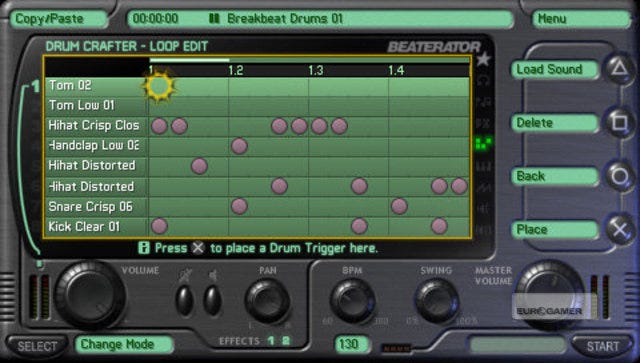
For musicians familiar with the Nintendo DS' Korg DS 10 package, Beaterator offers a significant upgrade in terms of features and raw potential, despite its somewhat cartoonish frontend. At its core sits an 8-track sequencer allowing up to eight audio channels to be filled with loops of music and then played back simultaneously to create a song. The 'Song Crafter' interface will be familiar to anyone who's dabbled with digital music-creating software. Time's represented on the X-axis, divided into bars and subdivided into 16th beats. On the Y-axis you'll find eight rows, each of which can be assigned to a different instrument. By adding loops to these channels you build up your song, adding texture and form layer by layer.

To begin with, the simplest way into Beaterator composition is to pluck ready-made loops from its library of thousands of premade samples. You can search this brimming database by genre or by instrument and, generally, unless otherwise marked, everything is written in the same key as everything else in order to loosely fit together. So, on the first channel you might cue up a drum and bass drum pattern, before adding a dub-style bass on the second channel, a classical guitar on third and so on. All of the loops match to the .bpm of the song template (which can be easily changed at any time) and so, in next to no time, even beginners can have a rhythm and melody up and running.
'Beaterator' Screenshot 1

A clutch of skins allow you to personalise the look of Beaterator's mixing console. However, the cramped screen never quite allows room for these to breathe.

Of course, while the stock loops are great for finding inspiration, if you want to start making unique creations you'll need to get stuck in writing your own loops and patterns. This is done via a standard Midi editor tool, which for melodic instruments presents you with a few octaves of a keyboard and then allows you to write in notes by hand along a rudimentary stave, right down to 16ths of a bar. Here you can set the length of each individual note and its associated volume and thus begin to write your own melodies. Once you're happy with your melodic 'loop' you then drop it into the mixer as you would any premade loop.

Samples in the library can all be individually tweaked, adding reverb, phase, and delay effects and you can even go into a waveform editor to, say, reverse a drum loop for style. Of course, you're fundamentally limited to just 8-tracks of simultaneous audio, so compositions can never become too complicated or layered, but as a pocket sketchpad for ideas, or even a tool for learning the basics of production and music composition, Beaterator is peerless on console platforms. Indeed, almost all of the lessons you'll learn in piecing together music are directly transferable to the aforementioned desktop programs, so would-be producers can be sure that they won't pick up any bad or superfluous habits.

Once your song is complete you can isolate and export individual instrument tracks as Midi files (useful if you're using Beaterator as a sketchpad away from a more serious set-up at home) or export your entire song as a .wav file ready to distribute to the world. Theoretically it would be straightforward to write and record an entire album of tracks before bundling them onto iTunes. In the event that this seems like too conspicuous a debut, you can always upload your song direct from the PSP to Rockstar's Social Club servers (a feature unavailable at the time of writing) in order to have it heard and rated by peers. While it's possible to import .wav samples to the sequencer (say, the a cappella track from NWA's Straight Outta Compton or Handel's Messiah Chorus, depending on your tastes) you won't be able to upload tracks that use bespoke samples to Rockstar's site (presumably to avoid licensing issues). Still, there's nothing to stop you creating, exporting and distributing whatever you want in the privacy of your own web-space.

We've started at the deep end of Beatertor's functionality because that's really where its value lies. Elsewhere there are concessions to beginners but these are, generally speaking, virtue-less over the long haul. A 'Live play' mode allows you to cue up a number of loops and freely switch between them as a sort of live set while a digitised Timbaland dances somewhat awkwardly to your efforts. While little more than a light distraction, it is possible to record your 'live set' and then fine-tune it within the Song Crafter mixer, as a sort of rudimentary remixing tool.

Beaterator's library of samples includes classical instruments as well as the expected cascade of warbly synths, but, predictably for a sample library at this price point, the quality of 'real' instruments is rather basic. Like its closest rival, Reason, Beaterator is naturally skewed towards electronic music creation. That said, it is possible to use the PSP's on-board mic to record onto your PSP's memory card as an impromptu sample creator, so if you do happen to kick ass at violin or French horn, you can add your own bespoke samples to replace the bundled ones (the quality of this recording won't be good enough for professional playback but, with some heavy effects, good stylised results can be achieved).

'Beaterator' Screenshot 2

Every area of the game has a useful, bespoke tutorial that will play repeatedly till you toggle it off.

Despite this dizzying array of features there are some natural limitations when compared to similar desktop releases. It's not possible to change tempo or time signature within a song, and the restriction of eight instrument channels and no smaller unit of time than 16ths may frustrate more ambitious composers. But really, the criticisms that can reasonably be levelled against Beaterator are limitations of hardware and not software. In a sense, Beaterator is held back by its choice of platform, but then, at the same time its choice of platform is inextricably linked to its purpose: to provide a musical sketchpad upon which young, would-be producers and music makers can learn sequencing basics and quickly realise their ideas. Its limitations are, in that sense, strengths, in that it's just accessible enough to not overwhelm the newcomer, while offering enough complexity and breadth of options to meet the aspiration of the experienced.

The opportunity to record your own live music over the top of your sequenced compositions, to export Midi files with your loops and to save out songs as .wavs are features that go beyond where console-based music packages have ventured before. The product may suffer from the sort of identity crisis that's bound to befall any software semi-dressed as a videogame, with the Live Play environment and visualiser sitting awkwardly with the more serious elements of the package. But what it lacks in cohesive identity it more than makes up for with raw features. As such, Beaterator is a rare triumph, a piece of sober software whose unusual ambitions are just about matched by its hardware's capabilities. For those with eyes to see and ears to hear, Beaterator may not be the soundtrack to the future, but it might just unlock the door for those who will write it.

8 / 10

Read the Eurogamer.net scoring policy

Comments (27) Latest comment 2 years ago

Comments threads automatically close after 30 days, but please feel free to continue chatting on the forum!

  • patchbox360 #1 2 years ago

  • cianchristopher #2 2 years ago

    Oooooooohhhhhhh!!!!!!!
  • bodypopper #3 2 years ago

    Think I'll wait for the iPod touch version. Can't be bothered to dust off my PSP which I haven't felt the need to use in, oooh, 18 months...
  • Stomp224 #4 2 years ago

    A spot on review: As someone who uses it as a sketchpad for midi files to integrate with my sequencer, it has just enough features to be really useful for working out some good beats during the otherwise non-productive daily commute. FX automation was a surprising bonus, but its a shame all FX information doesn't export in a .MID.
  • MiniAmin #5 2 years ago

    Great review and this game looks fantastic: an intermediary between music games and music software.

    /waits for someone to say "this game sucks just learn how to use logic pro 9/reason etc"
  • TopKatt #6 2 years ago

    @bodypopper

    Sell it on ebay then mate, you'll probably get £70 - £80 for it. Silly to keep something lying around that you never use.
  • jonsaan #7 2 years ago

    But how much memory does a typical song composition take up? If you start recording your own samples or vocals in WAV form you won't be able to have anything else on your psp? Can you detail you experiences?
  • cianchristopher #8 2 years ago

    Nice review, really well done. I like this game and all involved in making it. I like the PSP and will always cherish it.

    /waits for positive karma*

    *That's how it works, right? You say something positive about the game and get positive karma, say anything else and get negative?
  • Oh-Bollox #9 2 years ago

    so if you do happen to kick ass at violin

    Arse. ARSE. EUROgamer, not YankGamer
  • mungolikebeans #10 2 years ago

    I've already lost many hours on this. Great fun.
  • Sulphur_Man #11 2 years ago

    Interesting software. Terrible name though. "Beaterator" - what were they thinking?
  • bodypopper #12 2 years ago

    @TopKatt

    That much?
    I keep meaning to get God of War for it but never get round to it.
    Oh, and it has a dead pixel.
    Edited by 1 at 08/10/09 @ 12:02
  • presh #13 2 years ago

    I think this might be the thing that makes my PSP worthwhile again.... sounds very cool.

    I assume you could actually then use this as part of a DJ set using saved tracks played out via the audio out? Is the quality good enough?
  • Korpers #14 2 years ago

  • TopKatt #15 2 years ago

    @bodypopper

    It would depend on the condition its in and whether or not you have the box and manual and any games etc, but I just had a quick look and there are some on there with bids over £70 at the moment. With Christmas coming up it's a good time to sell anything that you don't use.
  • Chufty #16 2 years ago

    Hmm I dismissed this as soon as I saw it but maybe it's not so bad. Using it as a 'sketchpad' sounds like a good idea. I'll have to give it a try.

    Thanks for the review EG!
  • Widge #17 2 years ago

    Yeah I like the sound of this, would like a trial though. I remember getting PSPRhythm on CFW which was fun if a little limited.
    I can see this being something I'd like to have on digital download for whenever I fancy. I could make stems on Ableton and then play and tweak with them out and about.

    I loved Music by the way! One of the best things ever, I liked that you could bung in a CD and have autovisuals for it. Shame it got more limited as the series went on.

    EDIT: I can see this encouraging some 'proper' Minimal Techno creation for me via its restrictions of channels. I've been listening to Pom Pom stuff recently and it sits really well considering the sparse scattering of samples used in each track.

    I'm hoping its 8 channels of sounds, not 8 sounds at once (memories of Tracker/Octamed days). Doing a decent drum pattern would take all of that up.
    Edited by 1 at 08/10/09 @ 12:31
  • Widge #18 2 years ago

    RE: Wav size of a song, I'd say 100mb for a good 8 min track or so? Depending on the sample rate and bit depth of the render though.
  • Nithron #19 2 years ago

    Quoth my dad: "Sounds like some sorta wanking aid"
  • Skurmedel #20 2 years ago

    Seems very cool, but I guess you'll want to have the mentioned software as well if you are serious. Can anybody offer a comparison to Korg DS-10. This seems more sample-inclined, while the Korg is more of a synth...?
    Edited by 1 at 08/10/09 @ 12:30
  • shotgun44 #21 2 years ago

    The thing is, most people *Crofto*, have such strong opinions on games that they have never even played. Like all the people whining that MGS4 should have got a 10 because it's an MGS game... (I actually thought MGS 4 was awesome, for the record). It's just nicer to hear someone show some optimism about a game rather than dismissing everything before even trying it...
  • nuanimal #22 2 years ago

    Can't change Tempo!? :o(

  • old_skool #23 2 years ago

    Hi Simon Parkin,

    What are the load times like for this erm software, I'm tempted to buy this. I bought Music way back on the PS1 and although I made some songs it really was piss to use, especially when you're editing sample riffs or even making your own riffs , this was mainly due to the bad load times.
  • TILT #24 2 years ago

    What is it about "bespoke samples" that they appear in every second sentence of the article?

    Anway, highly interesting. The game/music production software, I mean.
  • dllord #25 2 years ago

    I think i'll stick to using Logic Pro 9 on my Macbook Pro thanks!
  • oktava #26 2 years ago

    I tried it and I can't handle the interface. It kills my creativity in an instant.
  • chunky_tesco #27 2 years ago