Digital Foundry: The Future of Anti-Aliasing

Cutting edges.

The current HD console generation is maturing, and developers are looking for ever more ingenious ways of extracting better-quality visuals from the fixed hardware configurations available, while conserving as much system performance as possible.

One of the key components in a quality, polished graphical presentation is anti-aliasing - the process whereby the distortion effects generated by rendering a higher-resolution image into a lower-resolution framebuffer are diminished. The most infamous - and perhaps the most off-putting - aliasing artifacts are of course the dreaded edge "jaggies".

Hardware multi-sample anti-aliasing (MSAA) is the most common solution to these issues, but it comes at a cost: it's heavy on RAM and bandwidth. Also, the deferred shading rendering techniques used in many of the latest games are incompatible with traditional MSAA on DirectX 9 hardware, and can incur a huge memory hit on DX10 and DX11. So, what if you could achieve arguably superior results to MSAA without so much of a performance hit?

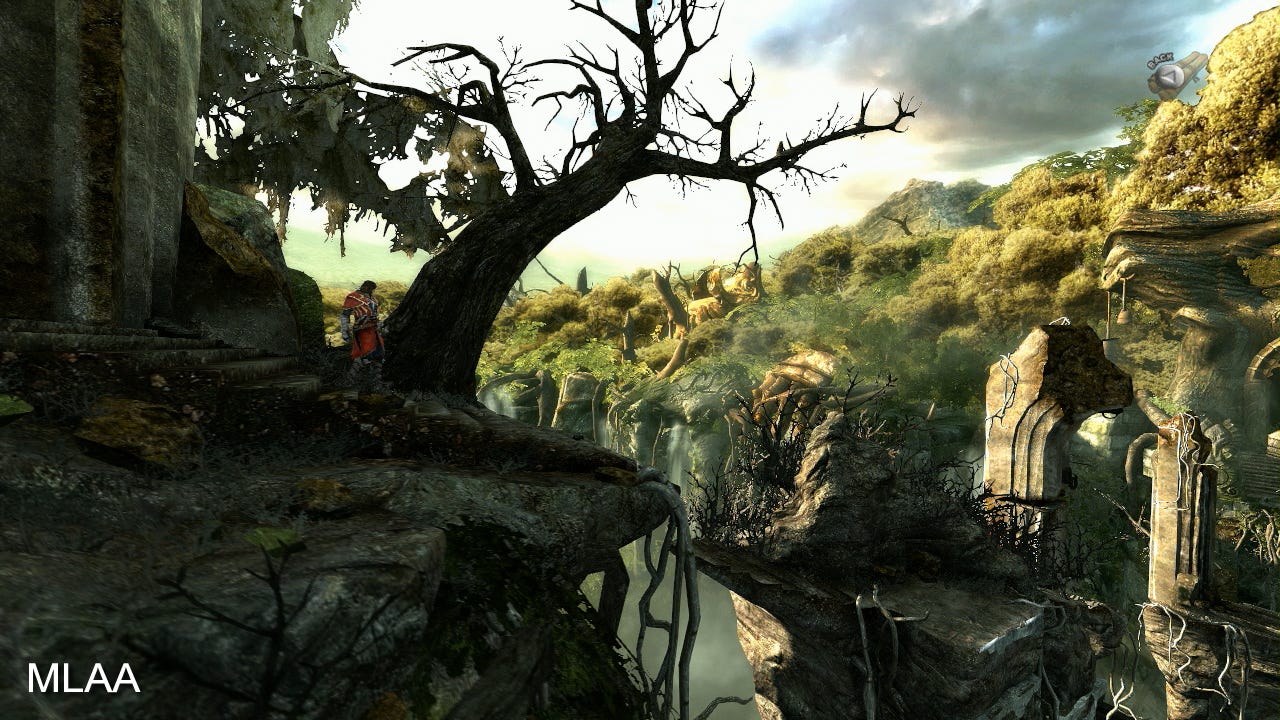
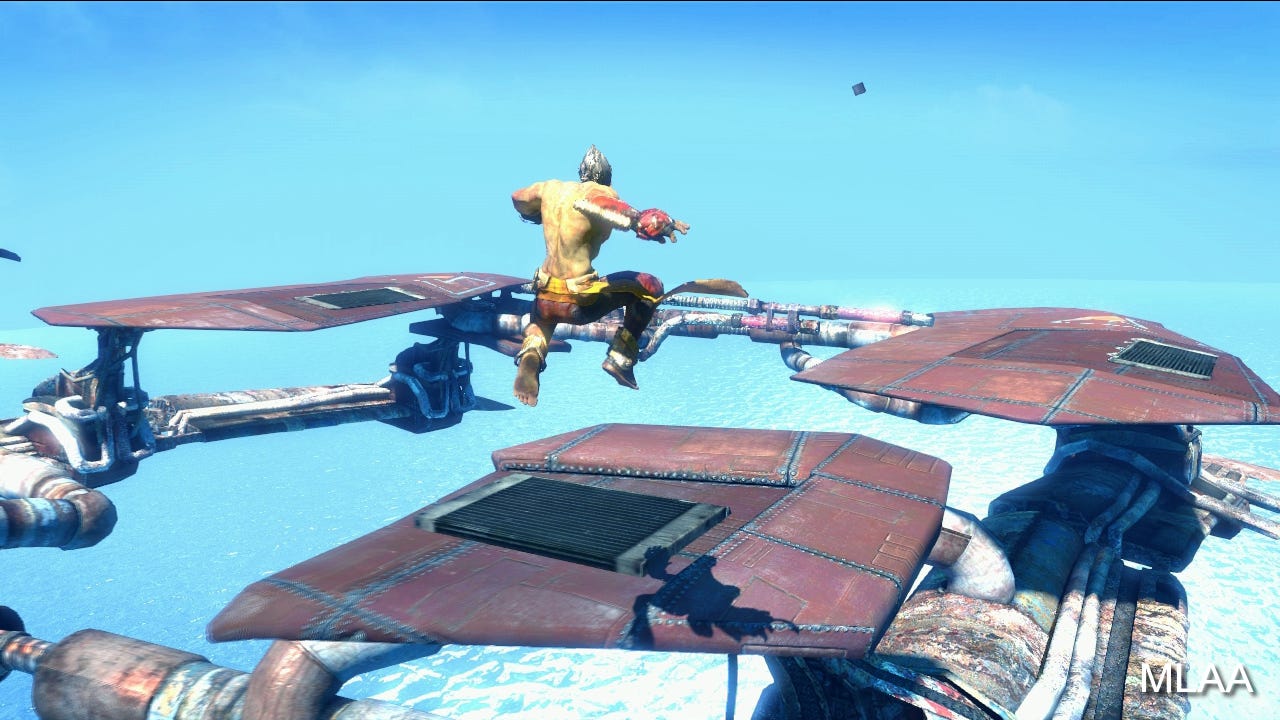
Games such as The Saboteur, Halo: Reach and Crysis 2 have all employed their own, more efficient customised anti-aliasing solutions, but perhaps the most popular technique is morphological anti-aliasing (MLAA) - as developed by SCEE's Advantaged Technology Group (ATG) and deployed on games such as God of War 3, Little Big Planet 2, Shift 2: Unleashed and the forthcoming Battlefield 3.

We're not entirely sure if SCEE's code is being used in all cases, but MLAA is becoming increasingly popular - Portal 2, Alice: Madness Returns and Red Faction: Armageddon are three further high-profile examples which appear to be using the same technique.

"MLAA is a fairly expensive algorithm that tries to pattern-match edges, and applies a blur/filter according to the best match," explains one of Criterion Games' tech masterminds, Alex Fry.

"Because it's search-based and uses a large set of patterns, it's expensive but can do a fantastic job when it finds a genuine edge; blurring only that edge and nothing else producing a flawlessly anti-aliased edge. However, when it finds 'false' edges - for example, finding an edge in a noisy texture that it really shouldn't blur - it will exaggerate noise since the blur effect will change direction from frame to frame (different patterns will be matched on each frame), exaggerating temporal aliasing."

MLAA's expensive computational algorithms have hitherto made it suitable running on PlayStation 3 only, with the super-fast SPUs working in parallel to process the image in around 3-4 milliseconds. But MLAA is now being developed for Xbox 360 and PC too in the form of Jimenez MLAA, created by Jorge Jimenez, Jose I. Echevarria and Diego Gutierrez.

Jimenez MLAA on a range of first person shooters: Battlefield: Bad Company 2, Borderlands and Bulletstorm. As post-process AA considers a flat 2D screen for analysis, we can use our HD captures in lieu of running in real-time. Note that HUD elements are also processed. In-game you'd hope to process the image before HUD is overlaid on top. Use the full-screen button on the player for 720p resolution.

Jimenez MLAA runs on GPU, and there have been suggestions that the technique loses an element of quality as graphics cores handle somewhat simpler code than SPUs. The Jimenez team take issue with this and can point to the results seen in the video clips in this feature, independently generated by Digital Foundry on clips of our choosing, filtered with their code.

"We can't speak for all the MLAA(-like) implementations out there, but we think our current version 1.6 - the one used for these comparisons - has raised the quality bar considerably," they say.

"In our tests, it produces results on par (when not superior) to CPU MLAA. One of our best features is that we are very conservative with the image: we only process where we are sure there is a perceptible edge; and version 1.6 does a pretty good job searching for perceptible edges. This allows preserving the maximum sharpness while still processing all the relevant jaggies."

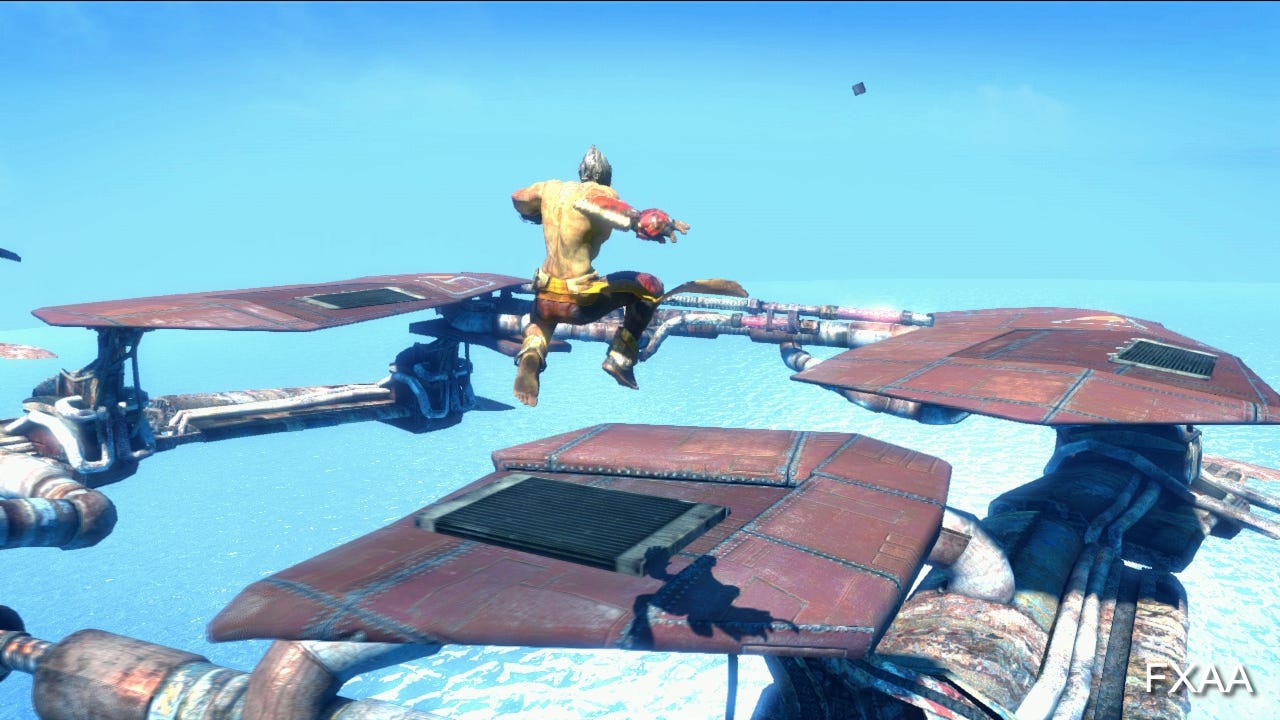
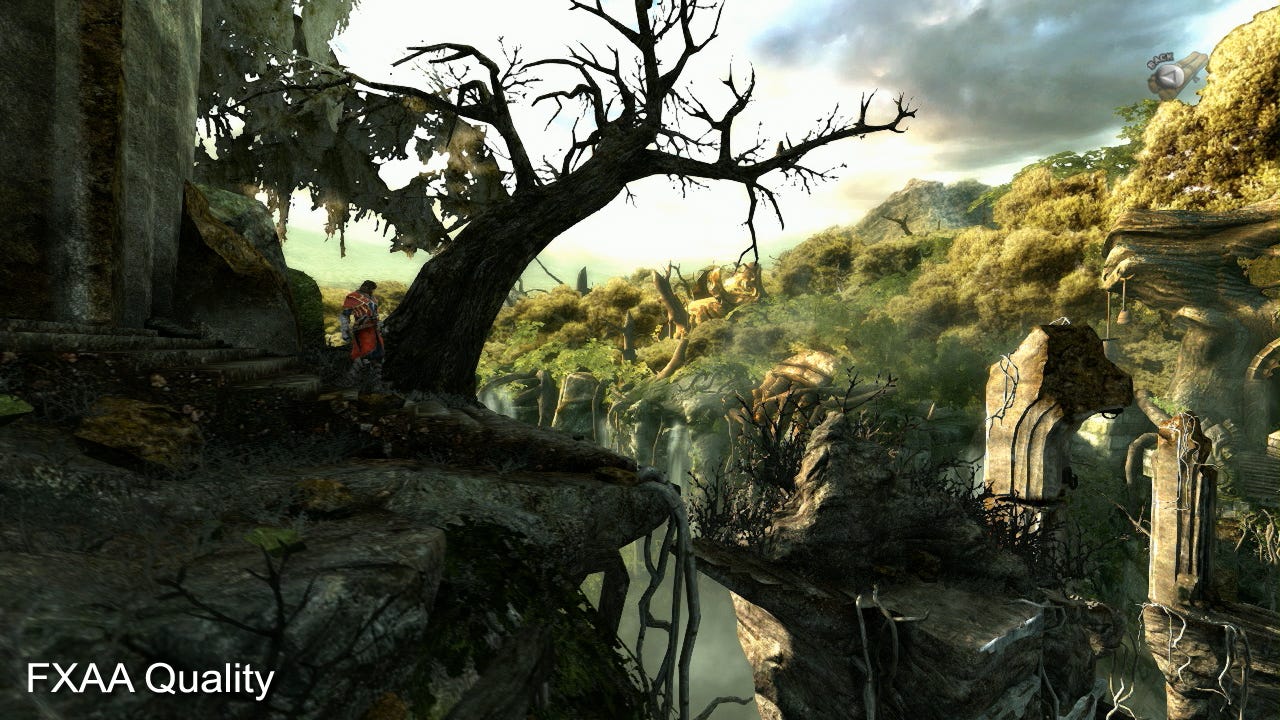
FXAA adopts a completely different approach, being more along the lines of what Alex Fry calls a "heuristic blur filter" better suited to noisier imagery. Timothy Lottes has developed specific "console" and "quality" iterations of FXAA designed to get the best out of current console and PC hardware.

"FXAA3 Quality - the PC version - is designed to take advantage of the feature and performance advantage PC GPUs have to provide very high quality," he says.

"FXAA3 Console is designed to be the best-possible quality under the constraint of using as close to one millisecond of GPU time as possible per 720p frame on both Xbox 360 and PS3. Visually the PC version is sharper and has higher quality on near-horizontal and near-vertical edges."

Lottes' original purpose in creating the technology was to "find practical techniques on today's hardware to bring the pixel quality of games closer to that of off-line rendered film," and this is an approach that is more than just smoothing off the jaggies.

"Beyond targeting edge aliasing like MLAA and DLAA, FXAA reduces the visual shimmering and flickering effect of sub-pixel aliasing by lowering the contrast of pixel and sub-pixel sized features," Lottes explains, revealing that his techniques are also faster than competing post-process anti-aliasing technologies.

"In terms of run-time, FXAA3 Quality is less expensive than MLAA, and FXAA3 Console is less expensive than DLAA. There is also another version of FXAA which has much higher quality than MLAA (less distortion) when applied to text and HUD elements."
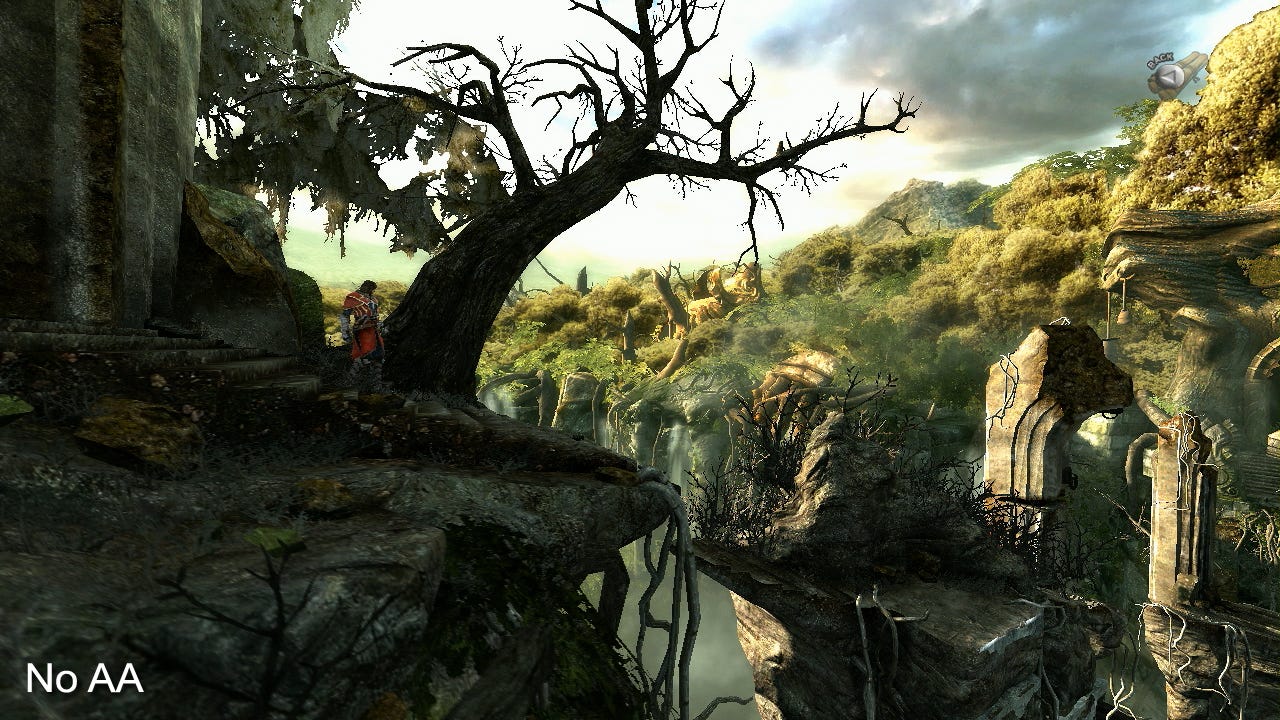
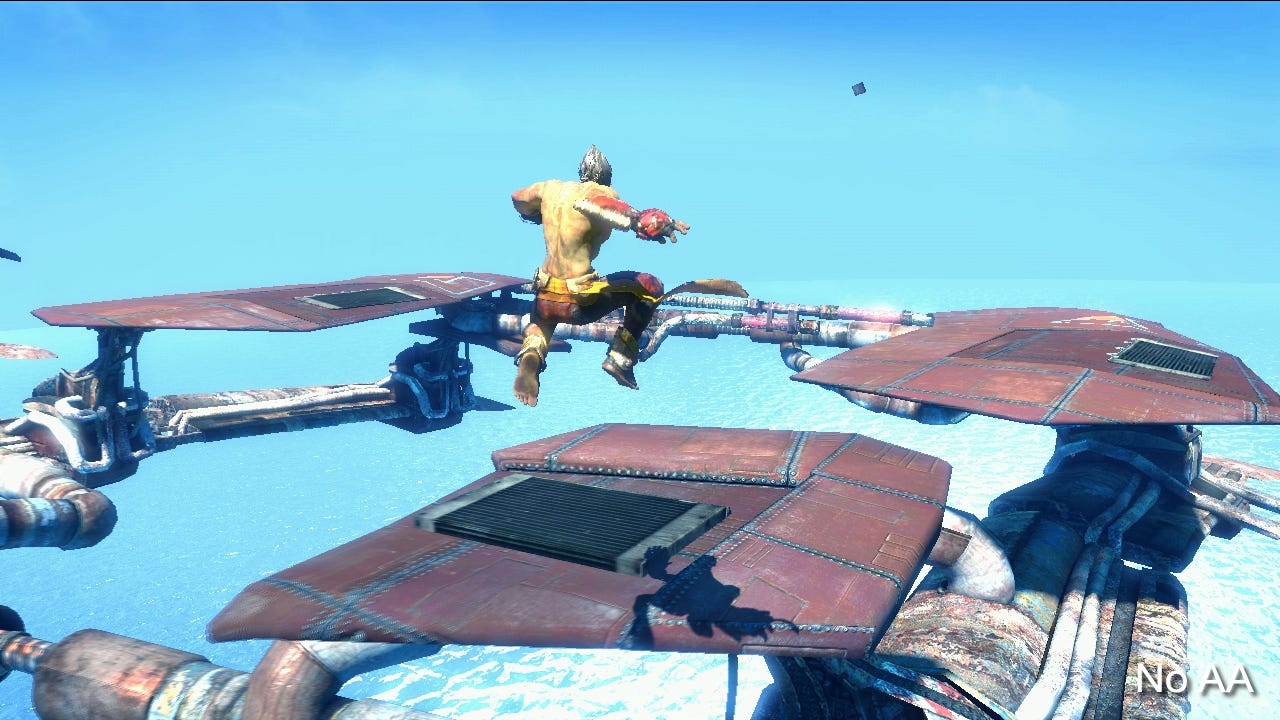
Comments (63) Latest comment 10 months ago

Comments for this article are now closed, but please feel free to continue chatting on the forum!

  • leafmulch #1 10 months ago

    Why is everyone so down on jaggies?
  • Cadence #2 10 months ago

    My eyes must be completely rubbish, but I really can't see any differences between most of these screen shots.
  • barrylyndon #3 10 months ago

    On pc @1080p there's no need for anti aliasing, so i prefer to turn it off.
  • menschenfracht #4 10 months ago

    on static pictures there is really no need for antialiasing, because there is no edge shimmering

    however, during actual gameplay even 1080p frame sequence would annoy you with high-contrast constant shimmering along the aliased edges.

    shogun 2 main screen with its sakura blossoms would be a good example.
  • Sunyavadin #5 10 months ago

    Of course, as anyone who has seen multi-platform games compared across formats knows: Having no antialiasing is better than having Quincunx.

    (edited for clarity since some people must have misread and negged me)
    Edited by Sunyavadin at 16/07/11 @ 22:08
  • emailtj #6 10 months ago

    #2, if your browser is re-sizing them or you for any other reason can't see them in their full resolution, you won't be able to see the differences.
  • CaptainQuint #7 10 months ago

    I'm suspicious of DF's predictions ever since their article on Force Unleashed 2 upscaled up to 60fps via some marvellous new technical trickery. They got everyone's hopes up by claiming it was the future for current console gaming.

    But nothing. Since that article there hadn't been a single mention of it anywhere. No developers of upcoming games appear to be interested in the tech. So much for that, then.
  • retr0gamer #8 10 months ago

    Bring back vector displays and we wouldn't have this problem :)
  • JorgeLuisBorges #9 10 months ago

    This is the thing I don't get about people who are against a new generation consoles. Surely the real benefit is better aa, longer draw distances, more particle effects etc - rather than necessarily having more complex models. A lot of games out there could already probably look a whole lot better if they could crank the settings ip to max, as it were.
  • BishBashRoss #10 10 months ago

    @barrylyndon
    Anti aliasing still gives improvement in image quality when running a game at your HD displays native res as the screenshots in this article demonstrate. It's not as pronounced as on an up scaled low res image though. I actually think the next gen consoles should and may well push for 720p with a high quality AA solution as opposed to 1080p. Consider the number of people perfectly happy to watch a movie at 720p or even dvd quality.
  • pantherjag #11 10 months ago

    Well as far as i can see MLAA is the best solution if the comparision screeshots are anything to go by
  • JensonJet #12 10 months ago

    I'd rather see a higher framerate and some rougher edges than a nice smoothed edge on 30fps. The differences shown in the example in the article are good, but they're so subtle I'm not sure they'd directly increase the enjoyment of a game.
  • TaniumZX #13 10 months ago

    Next gen consoles running 720p/60fps and good AA, on all games as standard will do me just fine.
  • carlosdfn #14 10 months ago

    The pics with MLAA clearly have the smoothest edges, the enslaved pic makes it obvious. Considering FXAA is cheaper it's worth the trade off but the results aren't as good imo, specially compared with console FXAA.
  • Pehmu #15 10 months ago

    Contrast and colours play a big role as well. Doom 3 is so dark you barely see any jaggies at 1080p if AA is turned off. Bad Company 2 and its bright outdoor maps are a different story - even at 1080p it looks very jagged if AA is turned off.

    I'm sure the next-gen consoles will go for 1080p. AA techniques get faster and faster all the time and it won't a big deal to have next-gen console games running at 1080p WITH a decent anti-aliasing. Hell, my 4 year-old PC can run 1-2 years old games at 1080p with 2xMSAA. Don't forget some current gen console games already use 720p resolution and 4xMSAA at the same time.

    Quincunx is usually pretty terrible. It makes the whole image look blurred and soft.
  • BishBashRoss #16 10 months ago

    @Pehmu
    This is true but consider next gen consoles are going to be pushing way more polygons, more impressive effects and much more demanding shaders. and with many HD TV's supporting only 720p if they do render at the full 1080p many people will not be able to benefit. For this reason I tend to think they'll aim for a high quality 720p image.
  • barrylyndon #17 10 months ago

    I've noticed I prefer certain games with no anti aliasing at a high res because I think the image looks too clean with aa on and also can affect performance on ultra settings. It is just personal preference.
  • BonzoBanana #18 10 months ago

    More than happy with current gen graphics (360/PS3) just want higher frame rates and more complex game worlds with more weather effects, characters and AI. Basically I want to increase the realism of the simulated world rather than its visual accuracy. I want enemies that feel like real people etc. I want to feel immersed in another world while the story unfolds.

    I don't want an enemy that hides behind the nearest barrel then pops up and down at regular intervals to fire before dieing instantly when shot by falling backwards. I want an enemy that varies how it fires, runs for better cover. Screams when shot and still keeps firing with less accuracy until he loses consciousness. Other baddies might have an emotional response to that person dieing etc and respond differently. That to me is more important realism than seeing anti-aliased hair growing out of the enemies ears.
  • Widge #19 10 months ago

    Use the right AA on the right game. I believe RL said he preferred kz2 quinqux to kz3 mlaa.
  • Pehmu #20 10 months ago

    @BishBashRoss
    Yes, there will be more polygons, glitter and bling-bling. Remember the time before Xbox 360? SDTV resolutions and SDTV televisions. No one back then thought (well, Microsoft certanly didn't) it would be stupid to release an HD console since basically no one had an HDTV. Back then the first HDTVs were 720p HD Ready sets, six years later 1080p Full HD televisions seem to be much more common.
    Xbox 360 did not only push more polygons and betters shaders but higher resolutions as well. It would be a complete surprise if this wasn't the case with next-gen consoles as well.
  • Pehmu #21 10 months ago

    @BonzoBanana
    I completely agree with you, but unfortunately we're living in a world where masses don't care about things like advanced AI if the graphics are only okayish.
  • GamesConnoisseur #22 10 months ago

    The BEST solution for the jaggies... Get a size or two smaller TV set than you currently owns!

    PC always going to be leading the evolutions in the visual processes, and where the next gen consoles would surely benefits too, all good news for us all.

    The biggest bugbears for me is in order,

    Screen tearings
    Wildly dropping frames
    Pop up textures
    Jaggies
    Low resolution (for the scale of the platform, ie handheld get by with lower res)

    It's largely on how the game best maintain immersion, and not causing this to be broken by tearings etc, and not due to the most realistic visual images. Uncanny valley and all that, great if its looks, moves and animates beautifully with a very solid gameplay.
  • orangpelupa #23 10 months ago

    @bishbash
    "and with many HD TV's supporting only 720p if they do render at the full 1080p many people will not be able to benefit. For this reason I tend to think they'll aim for a high quality 720p image."

    actually it will benefit. Console render at 1080p but downscale to 720p. Will give ultimate anti aliasing :p
    but maybe 768p + FXAA then downscaled to 720p will be enough (from reading the theory mentioned in article)
  • MENTAL1ST Verified Senior Software Engineer, Picsel UK Ltd. #24 10 months ago

    "Quincunx is usually pretty terrible. It makes the whole image look blurred and soft."

    It does sound a bit like two different rude words for lady-parts at the same time, though, that's some densely packed innuendo.
  • JamieR #25 10 months ago

    When ever i hear somone say video games are looking like pixar movies i think of poor AA thats the key thing that makes that statement not true.
  • Buran #26 10 months ago

    Any AA outside Supersampling AA is a bit a waste of time: at the end you're changing no jaggies for blurrier textures or artifacts. Anyway AMD said that their focus is to reach a GPU capable to render 15 millions of pixels circa 2015, so in a few years I'll be able to play with X4 SSAA any game in my current 27" 2560 x 1440 Dell Ultrasharp display
  • BishBashRoss #27 10 months ago

    @Pehmu
    I can see your point but there is only going to be a finite amount of processing power in the next gen machines and decisions are going to have to be made as to how that power is utilised. What I'm saying is I'd rather see that power be put to use in ways other than a sharper image.
  • Retro_ #28 10 months ago

    Next Gen consoles will be 1080p60 3D with power to spare for real time physics to more objects, grass etc etc, wind swirls etc..... Then I woke up, it was just a daydream sigh!
  • dagas #29 10 months ago

    IMO Anisotropic Filtering is far more important. I hate the blurry textures you get without it, it's especially noticeable in racing games. where the road gets blurry a couple of meters in front of the car.
  • n30n666 #30 10 months ago

    Ubersampling anyone?
  • Bander #31 10 months ago

    So, to summarise, new AA techniques look better if combined with multi-sample AA and/or higher resolutions. Who would have guessed?

    Meanwhile, developers continue to pretend that 60fps games don't exist.
  • Nephirion #32 10 months ago

    What about games like Halo where the framerate is dropped to 480p what would be the point of AA then?
  • sam90 #33 10 months ago

    Also, the deferred shading rendering techniques used in many of the latest games are incompatible with traditional MSAA on DirectX 9 hardware
    Yes, deferred SHADING is incompatible with MSAA on dx9 hardware, but this technique not popular this days and latest games incorporates other deferred technique - deferred LIGHTING aka Light Pre-pass. Crysis 2 using it, many (if not all) of the sony's first-party titles using it (uncharted, infamous...). Deferred SHADING on current gen consoles is very very rare. And important thing is - deferred LIGHTING is compatible with hardware MSAA on dx9 hardware/consoles.

    morphological anti-aliasing (MLAA) - as developed by SCEE's Advantaged Technology Group (ATG)
    Maybe I misunderstood, but MLAA is developed by Intel Labs - here is paper. Sony only ported it on Cell and optimised.

    Overall, very interesting article, but you forgot about SRAA. It's very interesting technique, that can be used with deferred shading and it solves main problem of the mentioned techniques - it reduces sub-pixel aliasing. FXAA, MLAA, all of them suffer from this type of aliasing.
    Edited by sam90 at 16/07/11 @ 20:32
  • Lucodeath #34 10 months ago

    Why would you want to use the ps3s spus on AA. The gpu needs there support for other important stuff.
  • Laythe_AD #35 10 months ago

    @n30n666

    Ubersampling makes my PC cry.
  • BBIAJ #36 10 months ago

    Oh good, have EG finally seen sense then and gotten rid of Shinji's pretentious self-aggrandising articles?

    I'd far rather have one from DF every Saturday!

    Their interviews with the developers themselves are by far the most interesting things on EG.
  • vizzini #37 10 months ago

    I can't help but feel when reading this article that DF has intentional strung together sound bites to paint many excellent games (that are mainly PS3 first part exclusives with loads of polish) in a negative light for the sake of the occasional flaw in the anti-aliasing icing and some how big-up (for the umpteenth time) the small delta on PC graphics, while ignoring that console exclusives are leading the way in games as entertainment.

    The quote about Killzone 3 must be massively out of context by Team Jimenez, especially when you consider the game is also dedicating/budgeting SPU resources (of more than 4ms) for Move support(which is a fresh experience in itself), and supporting 3D that helps suppress aliasing by using our brain's to do high end MSAA via our stereoscopic interpolating.

    As much as quibbling of AA made sense in the graphics era pre OpenGl 3.0/DX10, the fundamental problem of aliasing now is more than just undersampling and because we still use rasterization.

    Rasterization of primitives onto a rectangle of pixels(a renderbuffer) has no definitive answer leading to discrepancies in the implementations in ATI, Nvidia, Mesa3D drivers in regards of OpenGL and Direct3D. So because the basic building blocks alias in infinitely different ways in meshes or primitive form, hybrid anti-aliasing techniques can't be definitively correct either, when dealing with a composite of these aliasing errors.

    Personally the likes of Team Jimenez should start focusing on making great games with polish first, rather than this 2% icing that doesn't make a jot of difference on reviews of games that are fundamentally flawed (Edit: less than 7 out of 10) or just another 3rd person/FPS clone with a weak single player story and gameplay.
    All the games mentioned in this article having their AA techniques put under the microscope, are only worthy of discussion because they are infamously good ;) to start with.
    Edited by vizzini at 17/07/11 @ 09:33
  • Murton #38 10 months ago

    Screenshots are useless for comparing AA as you don't have edge shimmer, makes your point kinda difficult to make.

    Also no discussion of 3D in terms of AA? While not an AA technique in its own right I would have expected DF to have at least mentioned that when a game has actual visual depth the aliasing problem all but solves itself. I've played a few 3D enabled games now with a varied set of AA solutions and all of them look better with the 3D enabled in terms of aliasing, there's some sort of optical illusion like effect with 3D that seems to hide or resolve jaggies and other artefacts, would be interesting to see DF investigate exactly what's going on there as it could be the answer to aliasing issues this gen.
  • El_MUERkO #39 10 months ago

    In ARMA 2 I set my render resolution to higher than my display resolution, this improved the image quality massively and oddly hurts performance less than AA.
  • TheSpaz #40 10 months ago

    @El_MUERkO

    How did you set your resolution to HIGHER than the monitor's native resolution. Usually, that's not possible.

    Like, if you have a monitor that's 1920x1080, you shouldn't be able to change the display to anything over 1080p. Unless you're just running the game in a window and then shrinking the game to fit your display resolution. I'm not sure how that helps.
  • defragg #41 10 months ago

    @TheSpaz

    I guess the game renders to a framebuffer of whatever size you choose and then down/upscales it to the displays native resolution. In the case of downscaling it's practically (uneven) super sampling. Judged by some screenshots ARMAII features a high level of foliage, therefore super sampling greatly reduces shimmering/noise.
  • defragg #42 10 months ago

    @sam90
    I had a brief look at the SRAA paper but didn't find anything on the topic of alpha aliasing. Do you know if SRAA deals with these artifacts?
  • NeoTechni #43 10 months ago

    I want next gen to be for every game:
    -1080p 60 FPS 3D
    -no screen/vsync tearing ever
    -shadows that dont look like crap
    -multiple shadows
  • Uncompetative #44 10 months ago

    It is stupid to remove jaggies from a 2D image.

    'Elite' used Hidden Line Removal to enhance its wireframe graphics. Surely, AA could use its knowledge of a 3D model's edges to blur those that were in front. It need not bother with leaves and grass, which should be alpha blended textures - i.e. a tree would repeatedly reuse a leaf texture that blurred into translucency towards its edge and grass would also look "fuzzy" under closer inspection.

    You could even make it so that a model's "blur edges" were a separate encoding, so you only made the effort over those edges in the model that were particularly noticeable. Inferring what may be an edge using some clever algorithm is dumb.
  • sam90 #45 10 months ago

    @vizzini
    Rasterization of primitives onto a rectangle of pixels(a renderbuffer) has no definitive answer leading to discrepancies in the implementations
    If we are talking about dx10+ hardware, then we have this . Since dx10 rasterization stage is standardised and hardware must support it to be dx10 compliant. And because it's a hardware problem, doesn't matter, what API we are using. If it's a dx10 hardware, than, theoretically, result will be the same regardless of the APIs. But with dx10 API we can be sure - result will be the same.

    @defragg
    Yes, SRAA deals with alpha-tested geometry. Here is quote from the paper:
    Figure 9 highlights some interesting cases with high texture detail and alpha-tested geometry. SRAA does not add excessive blur to the image, as can be seen on the concrete, while also working correctly on alpha-tested geometry like the fences

    @Uncompetative
    It need not bother with leaves and grass, which should be alpha blended textures
    Should be, but more often it's an alpha tested geometry, which needs AA. On consoles we have only alpha tested vegetation.
  • darth_paul #46 10 months ago

    @Cadence
    defintely your eyes. if you cant see any difference between "NO AA" and "FXAA QUALITY", go see a doctor.
    you might still make it in time
  • vizzini #47 10 months ago

    sam09: If we are talking about dx10+ hardware, then we have this . Since dx10 rasterization stage is standardised and hardware must support it to be dx10 compliant. And because it's a hardware problem, doesn't matter, what API we are using. If it's a dx10 hardware, than, theoretically, result will be the same regardless of the APIs. But with dx10 API we can be sure - result will be the same.

    That's not quite the point I was driving at. And even then, rasterization isn't totally hard wired in GPUs, so that it can conform to OpenGL's rules or Direct3D's rules (of DX10 as you linked), or any other newer techniques that might yield more pleasing results.

    The DX10 rules still have the problem that individual polygons render as A then B sharing a edge (T-intersection/T-vertices) aren't guaranteed to be the same as polygon mesh comprising A & B, resulting in intermittent gaps appearing, which certainly isn't my idea of a definitive rendering solution.

    But what I was really driving at, can be best described by the aliasing problem seen in hidden surface removal(aka depth or z buffering)used for shadow mapping, which can't multisampled and stored at lower resolution.

    The shadow map at any fixed resolution can only hold one valid sample per fragment/pixel, irrespective of the number of partially covering primitives in each fragment/pixel.

    What this means; is that all other information is lost for that sample in the shadow mapping pass, and no amount of elaborate image space anti-aliasing of the camera viewpoint is going to retrieve it, or stop a slight change in light source or viewpoint camera from causing the image to z-fight (regardless of the raw post processing of the GPU).

    The issues I'm describing can be overcome in all situations with exhaustively large resolutions. But at such resolutions and performance requirements it would make far more sense to follow the film industry by using ray-tracing and gaining all its other benefits too; instead of persevering too many more years with rasterization techniques, which are quickly producing longer lists of exceptions than rules (at higher levels of realism).
  • sam90 #48 10 months ago

    @vizzini
    There is other ways to resolve z-fighting other than higher resolution buffers. It's not very big problem in majority of games, where view distance is small. And with increasing hardware power this problem will be smaller and smaller. Even in this gen i don't remember many games, that suffered from this types of aliasing. Low resolution frame buffers - yes, many many sony's titles with alpha-effects causing ugly artefacts, but it's just weak hardware. I remember one title, where z-fighting occured - uncharted 2. Snow bumps were z-fighting while camera moved - it was fun.
    Raytracing not a silver-bullet too, it has it's own flaws and weaknesses. For the near future it's unsuitable for real-time as well as photon mapping, radiosity and other GI algorithms.
    We stuck with rasterization techniques and i don't see technique, that will replace it in near future. I agree, it has many many problems, like any other technique. May be volume rendering will change something, like in id tech 6. But i doubt it will be popular.
  • vizzini #49 10 months ago

    @Sam09

    I'm not talking about objects z-fighting in the normal camera view, more about the resulting shadow aliasing changing erratically because the orthographically rendered (light view's) depth buffer has z-fighting geometry.

    I was also meaning ray tracing as an alias/pseudonym for all photon/ray-tracing the cgi industry employ for rendering and radiosity mapping. Even if these techniques have some difficulty with some techniques, the overall image is significantly better(more coherent) than those produced by the large set of case specific techniques originating in OpenGL/Siggraph and perfectly documented under DirectX as their own techniques on Microsoft's website :).

    Rasterization can still provide accelerated geometry culling, prior to cgi, to still have its place in the future, but as the console generations or average PC specs advance in the next five years, I'll be surprised if there isn't a time soon when rasterization as the final buffer rendering technique doesn't get replaced in at least PS4 or PC gaming.
  • driveboy #50 10 months ago

    I think that soon enough aliasing will be a problem of the past. As soon as the Wii-U comes out and hopefully most games start being in native 1080p, aliasing will be barely noticeable. Wipeout HD/Fury and Ratchet&Clank are perfect examples of it right now.
  • Thedaus #51 10 months ago

    A fair few things wrong with this article.

    Sony did not come up with MLAA, it was Intel (sony just made it a bit better).


    Also, MLAA is clearly not too computationally expensive for PC.

    Not only do some PC games support MLAA (The Witcher 2 AFAIK), MLAA was made by Intel (not involved with any console) and AMD added support for it to the CCC some months ago.


    The main reason that PC games don't use it much is because PCs don't really need it!

    All GFX cards that are used for any kind of high end gaming (and unlike the PS3) support MSAA and HDR at the same time, also unlike the PS3, PCs don't need their CPU propping up the GPU all the time. Sure some PC games do not support MSAA, but they are few and far between.
  • CaptainKid #52 10 months ago

    Clearly MLAA on those screenshots look best.
  • CaptainKid #53 10 months ago

    Clearly MLAA on those screenshots looks best.
  • Lunatic4ever #54 10 months ago

    @Cadence:

    Same's for me. They're takign this whole tech thang way too far. I really would like to know how many tech-nerds really care about this ultradetail that most of us cant even perceive really.
  • brizo75 #55 10 months ago

    Shogun 2 with hardware forced antialiasing looks awful. The shadows flicker about all over the place. I feel this obsession is a console thing as PC's can produce higher resolutions on better quality displays so the rendered image relies less on aa correction. I run a decent rig and the quality is so far ahead of my 360 that the games often dont even look like they are the same title, AA or not.
  • defragg #56 10 months ago

    @Lunatic4ever

    Enough to make it worth the investement, obviously.
  • KanePaws #57 10 months ago

    I like jagged edges, personally. If I cared about perfect realism I'd just look outside; visuals are the least important aspect of a game.
  • womble #58 10 months ago

    "On pc @1080p there's no need for anti aliasing, so i prefer to turn it off"

    Some people creating the first CGI shorts, at what became Pixar, thought the same way. They believed they only needed to increase resolution to solve aliasing issues. They were wrong, and Pixar went on to help pioneer the use of antialising.

    Of course, nowadays, EVERYONE in the industry realises that you ideally need some form of antialiasing.

  • sabbede #59 10 months ago

    @Cadence
    Maybe they are... I can't stand aliasing. Its worst in moving images - it causes a shimmering effect that I find to be more than distracting.
    @barrylyndon
    I run at 1280x1024 and I find it to be more than noticeable. However "1080p" sounds like you're running through a TV, which are usually kept much further from the eyes than a monitor is. At .5m, its impossible not to see the jaggies. Unless its a very small 1080 monitor. You need a monitor with very high DPI to counter aliasing.
  • CamberGreber #60 10 months ago

    It all come down to the size of your TV people.

    If you play games on a small tv or a 40 something in at ten feet away then yes these things wont matter as much BUT....

    ..IF like me you play on a HDTV that 50+ in at a distance of 2 feet away Jaggies are horrible and extremely annoying and break the sense of Immerison greatly.

    And thats what this generation was sopposed to be about playing games on Theater size Screens.
    Not buy Small HDTVs and playing them at great distances so that the image is blurred and looks great.

    Even in 1080p AA can make or break a game.

    PS. looking at those Castlevania shots MLAA whoops the other Post Processing Soulutions. Fxaa blurs the textures too much.
  • Kamil_ #61 10 months ago

    I dont think any of you know what aa is ......

    "On pc @1080p there's no need for anti aliasing, so i prefer to turn it off."
    hmm sure, on 1080p its easier to see.............

    "My eyes must be completely rubbish, but I really can't see any differences between most of these screen shots."
    Yes.

    now, my stuff, the 8 screenies above, 4 from each game,
    on the left, im not sure what game it is,
    The AA doesnt compensate for the crappy textures............

    Sorry but it's the truth
  • Oskool #62 10 months ago

    FXAA sure does blur the image a lot. It fixes the edges that makeup 10% of the picture, but reduces the image quality for the other 90%.

    I would rather deal with jaggies than have the entire screen look blurry instead of crisp and sharp. In other words, FXAA seems to do more harm than good.
  • Tikimotel #63 10 months ago

    Jaggies are indeed gone, the enslaved character's jaw line in the first video still looks square and blocked.
    Now all consoles need is more GPU power (and RAM) to push tesselation to eliminate blocky jaws and low detail curves in the geometry.