WarioWare DIY
Build!
For the past few years, no series has been quite as good at deconstruction as WarioWare. Whether it's reducing plot, controls, and tutorials to a one-word prompt, slicing out art assets until you're manoeuvring a wobbly stick man across an empty void, or fitting the salvation of an entire galaxy into the space of five seconds, Nintendo's fizzing, babbling, chirping oddities manage to make games truly simple, somehow without losing any of the magic en route.
If you're after the greatest possible bang for a single press of a button, then, Intelligent Systems' ever-youthful GBA original is still probably your best bet, unless you're lucky enough to be mentally unstable and sat in a nuclear missile silo. Meanwhile, subsequent instalments have proved equally adept at handling stylus swipes, prods from the Wii remote, and even a tilt sensor, which we don't talk about any more because it had, like, mercury in it and probably contained broken glass and horse cancer too.
WarioWare DIY turns the tables somewhat by putting the focus firmly on construction. This is the WarioWare game that will let you piece together your own micro-games: creating the central mechanics, sketching in the graphics, and even pulling the soundtrack into place one note at a time. It's an interesting challenge, and one that has brought changes with it, not least the fact that a game that used to take six seconds to get something fun out of now has tutorials that last up to 20 minutes.
Nintendo's rep told me that the bundled micro-games were built using the same tools you'll be using.
At Nintendo's recent media summit, I got a chance to sit down with DIY, and work through one of the very first of those tutorials. While Samus' rockets boomed through the ceiling and Yoshi burped and yelped noisily in the distance, WarioWare had turned a tiny pocket of the demonstration venue into something that felt a little bit like a school: tables and chairs were set up in rows, and people were hunched over their work.
There was only time to check out the most basic of lessons, but seeing as it has you building an entire micro-game, it offers a good sense of how usable the full package will be. The game in question is hardly an epic - in order to win, you have to prod a lazy ladybird to get it to move - but it's undeniably the kind of thing you might see in the very early stages of one of the older WarioWares.
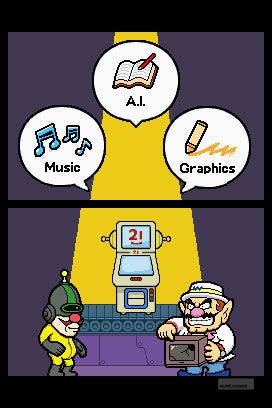
DIY breaks the business of creating a game down into a handful of distinct sections. You sketch a backdrop, you draw and then animate your objects, you create the music, assign AI, and then decide on a win condition. Each of these sections has their own editor, and the art and music ones at least are sufficiently straightforward and entertaining to mess about with in their own right. Even if you aren't feeling confident enough to make an entire game, in other words, there's still plenty to poke around with on a bus ride and end up feeling quietly creative.
Creating the background drops you into a fairly standard art package. You can draw, flood areas, switch colours or writing implements, clone objects, and even select from a suitably bizarre range of clipart. For the tutorial game – I think it was called Ladybird: Combat Evolved - all that was required was hunting down some grass texturing, making it green, and them spamming rocks all over the place. Done.
Next up comes the object stage: another art editor, very similar to the first, but with the option to create four frames of animation for each drawing. The ladybird came to life through a mixture of shape tools and freehand sketching, and it was fairly easy to layer it into a second cell as a transparency, and then redraw it - I'm about to use a very technical animation term - basically the same, but shifted a little bit to the left. Two frames of animation were all it took to turn a bad drawing of a ladybird into a bad drawing of a ladybird that sort of appeared to be moving if you squinted and were feeling charitable. Two steps in and Ladybird: Hell's Highway was coming into focus.

WarioWare's regular cast returns during the campaign.
The soundtrack section swaps out the art editor for a sequencer. Dropping notes into each beat slot is a simple business, with plenty of room to change the pitch after the fact, and there are multiple tracks to layer in alongside a separate rhythm bed. There's a range of instruments to choose from, too, and even a "hum mode" which allows you to use the microphone to make your songs sound even worse. My song sounded pretty terrible already, thankfully, so it was on to the next step. With a rousing theme tune, Ladybird: Extreme Condition was.. sorry, I'm going to stop doing this now.
AI's next, and unless you're a certain kind of person - the kind of person who keeps sheets of engineer's quadrille by the bed, often ponders why British people accept such basic offerings when it comes to light switches, and never wanders into town without at least five different screwdrivers attached to your keyring - you're probably not going to get that much of a kick out of this stage all by itself. Having drawn the art and created the horrible, horrible soundtrack, it was time to pull the pieces together.
To do this, Nintendo has essentially created a very bare-bones programming language. Thankfully, it's based around actual sentences rather than strange mathematical symbols which only people who earn £100,000 or more a year understand. The core of the system - although you can finesse it far more than you might expect - is creating variations on the sentence: "If A happens, do B." That one got me through my first marriage. (Thoughts to the family.)
In the case of the tutorial game, this meant, "If you touch the ladybird, make it wander off-screen", but it could just as easily be, "If you punch the robot, make it explode," or, "If you hit the glowing weak spot, do massive damage." Options are chosen from a list, and pretty soon you'll discover that you can get really complex behaviours going, setting objects on certain paths, assigning sound effects, and creating convoluted branching rules.
After all that, the final stage saw me returning to the AI editor once again to specify win conditions: ensuring for this example that when the ladybird moves off the screen, the player has completed the game successfully. Job done. On the way home, Infinity Ward rang up to offer me a job. The studio had some unexpected vacancies, apparently.
As a whole, DIY's looking like a lovely piece of work: a system that allows you access to some quite complex stuff, while making sure that you're never overwhelmed. A certain fiddliness is baked into game design, however - even if you don't have Peter Molyneux hanging around saying things like, "What if the swords could really talk?" - and while WarioWare's designers ensure that you're never more than a button away from the ability to test out what you've built so far, it's still going to take a lot of effort, and a lot of plodding through tutorials, to get the most out of it.

The lengthy tutorials are rife with pleasant bickering as Wario gets to grips with making his own games.
What's more, as LittleBigPlanet has proved, making the software is only half the battle: you still can't be sure until the day of release that people are going to use it. In this regard, though, DIY shouldn't have too much to worry about. Media Molecule's game may not have that many creators, but they're fiercely productive, ensuring a steady stream of new content for those who are happy to just spectate. Not only does DIY come with a solid suite of "proper" micro-games already installed, it will allow you to download new ones from the community fairly easily, while an additional WiiWare offering will let you then play them on the telly if you've already got the DS cartridge.
All of this is just skimming the surface, of course. A quick spin through the menus suggests that there's a kind of mission structure to the game itself, casting you as a freelance game designer completing projects for WarioWare's extended cast, along with plenty of ways to package your separate games together into actual rounds via the game blender, a cute visual means of keeping track of your saved projects, each with its own cartridge and label, and even the option to make standalone songs and four-panel comics.
It's a generous package, then, even if you aren't going to build anything. Beyond that, it's tempting to suggest that, if anybody was going to make a concept as tricky as this work, it would be Intelligent Systems. After all, they've been engaged in the complex business of keeping things simple for years.
You may also like...
-
Why Can't Games Do Sex?
-
Dear Esther Review
-
Bethesda on Skyrim's viewable Morrowind, Cyrodiil: "maybe we'll use it one day"
-
UFC Undisputed 3 Review
-
Valve selling a virtual Team Fortress 2 ring for $100
-
Solitaire Blitz Preview: Why PopCap's Approach to Facebook Gaming is Anything But Casual
-
Sonic 4 Episode 2 screenshots leak from Xbox Marketplace
-
Remedy discusses Alan Wake 2
-
Will there be a PS3 version of The Witcher 2?
-
PC Mass Effect 3 does not support game pads
-
Eurogamer.net Podcast #100: Ellie returns! And we filmed it!
-
Fresh Far Cry 3 teaser is full of swears
-
Street Fighter x Tekken PC release date announced
-
Comedian takes on Choose Your Own Adventure
-
Darksiders 2 release date announced
-
Mass Effect 3 teaser trailer invades Earth
-
Girl Vader stars in Kinect Star Wars trailer
-
Only Modern Warfare 3 made more money than Skyrim in 2011
-
Mojang won't sue FortressCraft dev, "bored" by Minecraft clones
-
Notch can match Schafer's $13m Psychonauts 2 budget valuation
-
Assassin's Creed 3, Splinter Cell: Retribution coming this year?
-
Why Devs Owe You Nothing
-
Metal Gear Online to be switched off in June
-
Happy Action Theater Review
-
Naughty Dog discuss Jak and Daxter development


Comments (22) Latest comment 2 years ago
Comments threads automatically close after 30 days, but please feel free to continue chatting on the forum!
Comment below viewing threshold Show
Ouch. Too soon...
Comment below viewing threshold Show
Step 2 - Animate it.
Step 3 - Think of a win condition.
Step 4 - Upload.
Comment below viewing threshold Show
Step 6 - Reflect.
Comment below viewing threshold Show
What does this say about us? I don't think I want to know.
Comment below viewing threshold Show
I admit I never played the twisted one though.
Comment below viewing threshold Show
True dat - I'm on less than £20K!
Comment below viewing threshold Show
I'll definitely be picking this up at some point.
Comment below viewing threshold Show
I like the DS stylus, but i also like the Wiimote. Which is best? There's only one way to find out...
Comment below viewing threshold Show