Needs change, and for this reason, six months ago, Xbox Live was in trouble. Once the brave, slick and - yes - innovative centrepiece of Xbox 360, it began by offering so much that developers struggled to do it justice. After three years, they had caught up and, in some cases, overtaken it, and the Live team was forced to start making concessions. Rock Band was allowed its own Music Store. Halo 3 was allowed its own matchmaking and party systems. Major Nelson's catalogue of notifications was no longer a hobby, it was a corporate imperative. The plasters and stitches of biannual dashboard updates were unable to contain a once-brilliant interface, voluntarily haemorrhaging uniformity to satisfy developers and gamers for whom it had crossed over from an obstacle overcome to an impediment to fun.
Time for a reboot, then, and following a brief download, that's all it takes to get up and running with New Xbox Experience. Five minutes after being shovelled the download and watching an attract sequence, you're staring at a new horizon - the curved plateau of the new dashboard, home to a series of rectangular panels showcasing new content and expected functionality, with simple menus, prompts and widgets sprinkled over the screen.
It's new, but it's familiar: there's your gamercard in the top-right, flashing up the number of messages and friends you have online, and then your gamerscore, while a rolodex of stick-activated options in the top-left explains what's on the central panels, and your new Avatar stands to one side, tilting his head and waving as your thumb brushes against the right stick. You have no choice but to make an Avatar. It's the first thing New Xbox Experience does. You can pick from any of ten pre-rolled models, or flush them for another ten randoms, or start customising. We picked the first one that didn't look like it had stumbled in from a Gap advert and vowed to come back to him later.
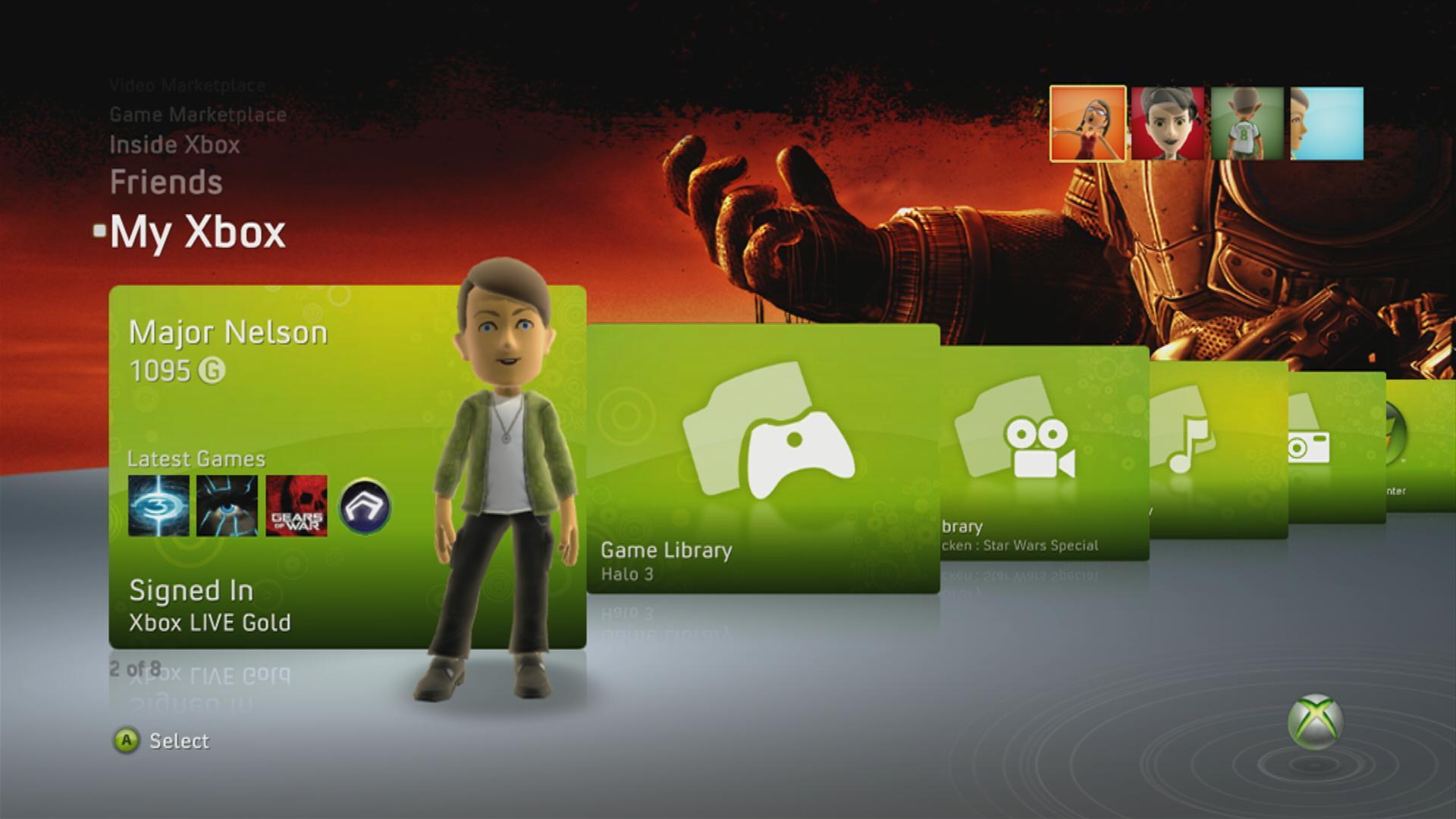
My Xbox replicates most of the old dashboard functionality.
We were more interested in the interface, and anticipating this the New Xbox Experience includes a series of introductory panels under the Welcome banner, showcasing each new feature in brief: the Avatars, the Party system, Community Games, installing games to the hard disk, and accessing Marketplace through your PC web-browser. This What's Hot screen will be used to explain future dashboard updates, too, and elsewhere on the Welcome pages you can view basic information about Xbox Live's existing features (the Guide button, online play, family safety, profile, games, movies, wireless peripherals, privacy), review the flashy intro movie and, thankfully, tell the channel to go away until it changes again.
Do that, and the main entry point until that day - the new Xbox Live homepage, if you like - is Spotlight. Spotlight shows you what's in the disc tray, and provides access to your gamercard, while your Avatar steps closer and emits your motto through a speech bubble. Dig further into this and you can explore Achievements in a manner similar to the boxy Games Library panels of the old dashboard, hovering over each for an explanation rather than having to click through, and each game's panel is topped with bars illustrating your Achievement progress. Spotlight also does as its name suggests, and advertises content like the recent Pro Evolution Soccer 2009 demo and Age of Booty. Xbox Live product unit manager Jerry Johnson told Eurogamer that these will be a mixture of paid-for and extra-curricular placements designed to show you around (you can hear more from Johnson in a separate interview).
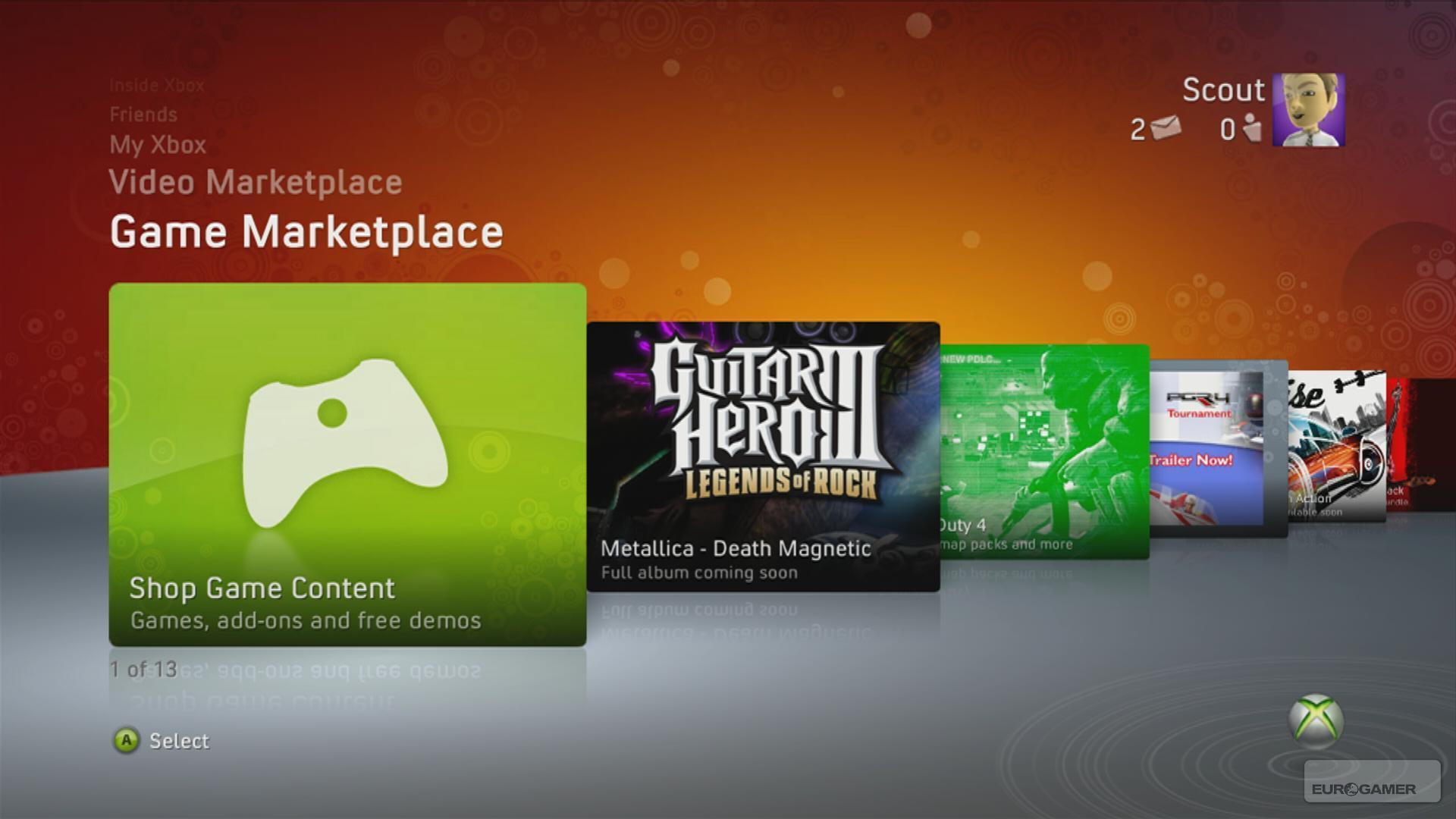
The new Marketplaces are a bit ad-heavy, but definitely improve browsing.
Moving up the rolodex with the d-pad brings you back onto the familiar ground of the Game and Video Marketplaces, and both have been reorganised to fit the NXE framework. Most agreeably, you can now browse by alphabet, genre and collections (Arcade, Demos, Originals, etc.) and move between these options, and the well of content beyond each stab of the A-button, at a pace that the old dashboard never matched. Head to a specific game and a series of panels allows you to try, buy, visit the full per-product content catalogue, or flit between featured downloads, a screenshot slideshow and Xbox.com-style product information. It won't be possible to access Marketplace via the internet (presumably) until launch, but when you can you will also be able to remotely instruct your Xbox to start downloading the content - free or premium - that you want.
Jerry Johnson insisted that a central tenet of the New Xbox Experience is "serendipitous discovery of content" - in other words, giving you stuff to do rather than expecting you to fire up the box with a plan already in mind - but after a few hours' use it's hard to shake the feeling that, among the more useful rows of panels showcasing the latest and most popular downloads, the new channels are simply a new wave of adverts that push beyond the old dashboard's capacity.
Then again, the conflict between paid placement and promotional altruism is a difficult ethical balance for any entertainment service to strike, and smooth, intuitive navigation negates some of the criticism; you can slide on by if you don't need to be told what to do. The new Community Games area of the Game Marketplace is another weight on the right side of the scale. Although pre-launch it hosts just three basic games (Culture, Netters and Net Rumble) that feel like placeholders, it's clear that the fruits of all those amateur codeshops' toil with XNA Game Studio aren't being shunted aside. Each enjoys a healthy profile, with artwork and options equivalent to full-price product, and while the lack of standards-body ratings is firmly disclaimed, the product description explains the peer-review verdict that preceded each upload. In Netters' case, it's Violence 0/3, Sex 0/3, Mature Content 0/3 (which seems like a missed opportunity to us, but okay).
Away from the Marketplaces, there's the My Xbox series of panels, which is a more comprehensive suite of personalised panels closer to the old dashboard functions than Spotlight. There's tray management and your gamercard again, the game library (with its recent games list and options for deeper browsing), video, music and picture libraries (with a photo-sharing application scheduled for launch later), and Windows Media Center and System Settings access. Johnson (him again!) told us that NXE supports all the same video and audio codecs as its predecessor.
The Friends street is likely to upset a few people, but the old Friends list is replicated in the new Guide.
Viewing your gamercard and the profile options accessed within, you can head into the Avatar customisation suite (designed by Rare, remember), and it's about time to head that way before we move on to the new Friends street channel. Avatars have arguably overcome the "Mii too" stigma of their introduction at E3 this summer, and accusations of commercialisation are wide of the mark so far. Wardrobe options are relatively limited (for instance, you can't change the colour of clothing items), but if the goal there is to force you to go shopping with Microsoft Points then the shops are currently closed. Instead you can pick from reasonably varied options (and save off the ensemble), and play around with your face. Our experience here was mixed: Eurogamer designer Martin Taylor managed to capture his own likeness pretty quickly, but struggled to find the right combination of sleepy, crushed eyes, thick sloping brows and boring extremities that tell the story of my own decaying bonce, complaining that it's not possible to move individual facial features around (thanks), bemoaning the absence of stubble in the binary beards and wondering aloud whether the unisex catalogue of androgyny was the right call.
Then we settled upon some scary warpaint and all was well, and agreed there are some nice touches throughout. As well as previewing each option on the main character model - which takes up half the screen and can be spun and tilted with the right stick - as you manoeuvre through the catalogue of options for each feature the individual choices show how that crook of nose or bushiness of brow would appear on the face you've already composed. As you're probably tired of hearing, it's all very slick, and there's a breezy, affectionate sense of fun that these tools demand to evade sterility; taking a picture of your Avatar for a new gamerpic involves posing him or her for the camera, panning, zooming and snapping, and perhaps bonking its head on the lens or dizzying it with a few too many rotations beforehand. It's a pleasant experience.
Old themes are supported, but it's only worth resurrecting a few of them.
The new dedicated Friends channel, though, is more likely to divide opinion, as individual friends appear in Avatar form in front of a 3D-esque background diorama informed by your choice of NXE Theme. The problem is that, while you can view and interact with friends easily enough, the immediacy of the old list format is lost and you're expected to gauge status based on physical demeanour, and navigate miles down to the road to reach those at the poor man's end of the alphabet.
Themes are also responsible for the graphical background to the whole NXE, with a few gentle starter themes to choose between along with the more imposing "Night". NXE is also compatible with existing themes, although their implementation varies. Some - generally those with a big, graphic centrepiece like Lara - are a satisfying presence beyond the main dash horizon, and their other graphics are pleasantly arranged around the various deep menus like the Marketplaces. Others, though, just look crap, as they struggle to wrap around interface decisions they were never designed to anticipate. We've been told by Microsoft that the old themes' original creators have the option of retrofitting them with appropriate updates, but how many publishers will agree to finance that when they can just churn out some new NXE themes instead and charge for them all over again remains to be seen. Although you can probably guess.
One thing developers and publishers won't have to worry about is compatibility with the new Party or install-to-HD options. The latter allows you to copy the contents of a disc to your drive, hopefully to speed up load times, although you will need the disc in the drive to authenticate. We haven't had long enough with NXE to gauge how much of an improvement installation is over playing off the disc, but we'll take a look in the coming weeks. In the meantime, we can say that installing Quantum of Solace (look how we sacrifice ourselves) took 12 minutes. Fortunately it's optional, and excellently, this doesn't preclude you from accessing the Guide.
You'd almost forgotten about the Guide, hadn't you? Jerry Johnson told us that getting new gamers to understand the Guide button was one of the most difficult challenges the designers of Xbox 360 faced, but for those of us in the know - and particularly for anyone who has yet to be sold on the New Xbox Experience as a whole - the Guide is a lifeline. Hit it and instead of a grey layer on the left, a navy rectangle pops up and dominates the screen. And as far as you'll be concerned, it's the old dashboard.
It's got blades. It's got the old Friends list, and the old Achievements lists. It shows you Active Downloads and allows you to redeem product codes without leaving your game. Heading off to Marketplace, or game or media libraries, system settings or account management, means navigating away from whatever the Guide currently overlays, but thanks to a Quick Launch page, it's also a gateway to other games, allowing you to hotswap Xbox Live Arcade titles and even disc-based games. You'll have to put discs in the tray if they're not already, but otherwise it's a couple of clicks and you're suddenly skipping through the new game's intro screens to your destination. There are none of the old dashboard interstitials, either - those flashes of green between hitting "Play" on a finished download and getting into the game. NXE never seems to be confused about what you want to do; it's been designed, not hacked, to do the things it offers.
Community Games is one of the most interesting ideas in the NXE.
The Guide is also your access point to the new Party system, where you can gather eight of your friends together in a voice-chat channel and move the group between games. You don't even have to be doing the same thing: you can just chat along regardless. And because it's a service layer, it automatically works with all your existing games. Gears of War treats it like it's always been there. Instead of inviting a player, you invite the group; instead of ending a session and having to reassemble for another, you stay together. You can open it up to friends or set it to be invite-only, and while it's one of NXE's quieter additions, it's also its most authoritative statement: this is Microsoft saying, "We figured we might need to do something like this, so we made sure we could."
It's a fitting place to end our tour of the New Xbox Experience, because, as a whole, it demonstrates that while Microsoft did not anticipate the demand for platform-level grouping, visual social features like Avatars, nor the sheer volume of content Xbox Live Marketplace would come to host, it set in place foundations as best it could, and is now reaping the rewards. By compartmentalising common functionality, it's been able to introduce features that not only improve future Xbox games, but improve old ones too.
"Serendipitous discovery of content" rings a little hollow - right, thanks for all the new ads - but, as Parties demonstrate, there will be headroom into which to manoeuvre, and we wouldn't be surprised if one of next year's iterations introduces something like Digg spliced with Major Nelson's blog to really empower the community Microsoft professes to love and live up to the serendipity mantra. As Community Games shower from the XNA heavens (or bedrooms), it'll be interesting to see how the Marketplace functionality evolves.
For now though it's smoother and easier than ever, and concerns we had beforehand about that 90MB first-in-first-out cache and the chances of staring at screens waiting for stuff to load in prove to have been misplaced. The background downloads are quick, quiet and have no impact on performance, which is brisk throughout, and whichever of the Live team's programmers spent weeks optimising the new Guide to make the most of its slender resource deserves a pat on the back.
Individual games' shopfronts are better organised, more descriptive and certainly impactful.
If the Party system is NXE's biggest chest-puff, then the Guide is its smartest flourish, replicating the old dash almost to the word, and thereby giving hardcore users with no need for a flashy UI the means to resist NXE's charms almost permanently, and giving those who find it all slightly overwhelming a stable, familiar core around which to plan their forays into the new functionality. And once they get past that initial feeling of a world turned upside down, the Guide panel resumes its periphery role.
It's a great progression, topping off a great dashboard reboot, and in light of Sony's recent struggles - endless Trophy patches with no retroaction, most notably - it reinforces the widely held view that Microsoft is winning in software and will continue to do so. All that remains, following NXE's 19th November launch, is whether the Xbox 360 hardware now holds up for as long as the guts of Kutaragi's swansong, and how much of the New Xbox Experience's progressive thinking Sony will discover it needs to incorporate in the months and years to come. By then, expect Microsoft's software engineers to be well into the next New Xbox Experience, because as this one demonstrates, they're well aware that needs change and how to prepare for them.
New Xbox Experience launches on 19th November as a free download.
